
What WordPress Maintenance Plans Actually Include and Cost
WordPress maintenance plans are monthly service agreements that keep a site updated, secure and functioning after launch. They’re important because WordPress sites change constantly – skipping maintenance leads to broken features, performance issues and increased vulnerability to attacks.
However, not all maintenance plans are the same, with pricing ranging roughly from $30/month to $5,000+/month, depending on scope and complexity. That’s why this article breaks down what WordPress maintenance plans actually include, how pricing tiers differ, and what to look for when evaluating your options.
What WordPress maintenance plans include
WordPress maintenance plans bundle two distinct types of work, and most confusion comes from not separating them clearly:
- Proactive maintenance runs on a schedule and is the baseline every plan should cover. It includes updating WordPress core, plugins and themes. It also encompasses running automated backups, scanning for vulnerabilities, monitoring uptime and, in some cases, basic performance optimization. The goal here is to prevent problems before they happen.
- Reactive support is on-demand work that happens when something breaks or when you need help. That could mean fixing a failed update, resolving a plugin conflict, restoring a backup, or troubleshooting a broken checkout. This is where expectations often break down. Many plans either limit this work to a set number of hours or charge for it separately, even if it’s triggered by an update.
This distinction between proactive maintenance and reactive support also explains the fine print behind “unlimited edits.” Most providers restrict edits to small, quick tasks – like changing text or swapping an image – typically capped at 20–30 minutes per request. More complex work, such as building new pages, writing content, or modifying functionality, is excluded or billed separately. Some lower-tier plans don’t include edits at all.
Not to mention, certain managed hosting platforms handle parts of proactive maintenance at the infrastructure level, which changes what you actually need from a separate maintenance plan.
WordPress maintenance plan pricing by tier
Pricing for WordPress maintenance plans follows the same pattern as what’s included: the more human oversight and support involved, the higher the cost. Most plans fall into three clear tiers.
Budget plans
Budget plans ($30–$100/month) focus almost entirely on automation. Updates are pushed directly to the live site without staging or testing, backups are often stored on the same server, and security scanning is basic. There’s typically no developer time included. If an update breaks something, fixing it is billed separately. At the lower end ($30–$50), many plans run fully automated updates with little to no human review.
Mid-tier plans
Mid-tier plans ($100–$300/month) introduce limited reactive support. This is where you’ll see included support hours or “unlimited edits” (with the usual restrictions). Bug fixes are often covered, and some providers add staging environments for safer updates. For many business sites, this tier balances cost with practical coverage.
Premium plans
Premium plans ($300–$1,000+/month) are defined by active oversight. Updates are tested in staging before going live, often with visual regression testing to catch layout or functionality issues. These plans include dedicated support, priority response times and multiple developer hours each month. Plans in this tier layer in staging-tested updates, malware cleanup and ongoing development support.
A practical way to choose the best tier for you is to estimate your site’s hourly value. If a few hours of downtime would cost more than a year of maintenance, a higher-tier plan often pays for itself.
Why WooCommerce stores pay more
WooCommerce sites almost always fall into higher pricing tiers because the risk surface is larger. Every update needs to be validated against core revenue flows – checkout, payment gateways and order processing. Even small conflicts can block transactions or corrupt data.
That added complexity is why WooCommerce maintenance commonly starts around $500/month and can exceed $3,000 for larger stores. Plans at this level include post-update testing, monitoring for payment and inventory issues and faster incident response. For example, Codeable’s Advanced tier ($590/month) includes WooCommerce-grade regression testing and malware cleanup.
Lower-cost plans that push updates directly to live without verifying checkout flows introduce real financial risk for any store processing transactions.
Managed hosting vs. a separate maintenance plan
Managed WordPress hosting and maintenance plans overlap, but they are not the same thing. Understanding where one ends and the other begins is what prevents you from either paying twice or leaving critical gaps uncovered.
Most managed hosts handle infrastructure-level maintenance. This typically includes WordPress core updates, daily backups, security monitoring, SSL, CDN delivery and server-level caching. Platforms like Pantheon are built around this idea – standardizing the environment so routine operational risks are handled automatically rather than reactively.
What they usually don’t cover is application-level maintenance. That includes testing plugin and theme updates in staging, fixing conflicts, handling website edits, running performance audits, or providing ongoing support when something breaks. For more complex sites, this is where most real maintenance work happens.
The practical split is simple. If your site is relatively simple – few plugins, no custom code, low update frequency – managed hosting may cover most of what you need. As complexity increases, a standalone maintenance plan fills the gaps that hosting doesn’t address.
When the platform handles maintenance automatically
Some platforms reduce the need for a separate maintenance layer by building update testing and deployment controls directly into the hosting workflow – but it’s important to be precise about how this works.
On Pantheon, every site runs on a structured Dev, Test, Live workflow for controlled deployments.
Image
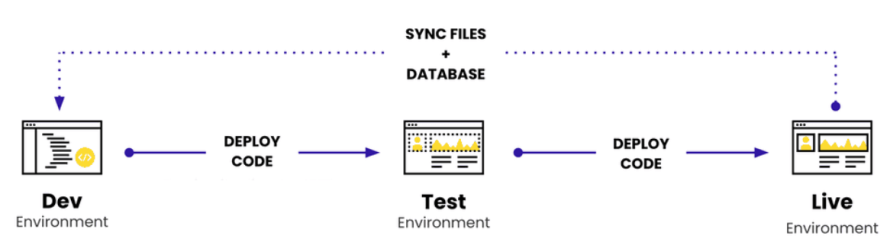
Pantheon's Gold workspace ($500/month) includes features like Autopilot, which introduces a separate, system-managed testing process for plugin and theme updates. Updates are executed in an isolated environment specifically designed for automation, where changes are evaluated using techniques like visual regression testing (comparing before-and-after states). Only updates that pass these checks are promoted forward.
For teams managing multiple sites, Upstreams allow a single codebase update to propagate across many sites simultaneously, turning maintenance into a centralized operation rather than a per-site task.
This level of automation significantly reduces manual effort and the risk of update-related breakage. However, it does not replace all aspects of maintenance. Content updates, design changes, and custom development work still require human input, whether through an internal team or an external provider.
Updates, security and what happens when something breaks
Plugin updates sit at the center of WordPress maintenance – and they’re responsible for both the most common failures and the biggest security risks.
Most site breakages happen when a plugin update introduces a conflict. At the same time, unpatched plugins are the leading source of vulnerabilities. It’s the same root cause in two directions: update too aggressively and something breaks or delay updates and expose the site to attack.
In 2025, 11,334 new WordPress vulnerabilities were reported, a 42% year-over-year increase. Plugins accounted for 91% of those vulnerabilities, while highly exploitable vulnerabilities rose 113% year over year. The weighted median time to first exploitation was just five hours. Meanwhile, 46% of vulnerabilities were unpatched at the time of disclosure.
At the same time, 64% of WordPress professionals reported experiencing a full breach, yet only 27% had a recovery plan.
This is where maintenance plans diverge in practice.
In lower-tier plans, updates are often pushed directly to the live site. If a conflict occurs, the issue is discovered after users are affected,, and fixing it becomes a reactive, billable task. The site breaks first, then gets repaired.
Higher-tier plans reverse that sequence. Updates are tested in a staging environment before reaching production. If something fails – layout shifts, broken functionality, checkout errors – it’s caught during testing. Tools like visual regression testing compare before-and-after states, and failed updates are rolled back before they ever reach visitors.
Platforms like Pantheon enforce this workflow structurally through Dev, Test, Live environments. Updates must pass through staging before deployment, reducing the likelihood of production breakage.
The takeaway is straightforward: maintenance isn’t just about applying updates – it’s about controlling how those updates are introduced.
How plans handle malware and hack recovery
Malware handling varies significantly by tier, and it’s one of the most important details to clarify upfront.
Budget plans typically focus on detection – running scans and alerting you to issues – but charge separately for cleanup. Some providers charge $200 or more per incident for malware engagement. You’ll generally need to opt for the highest tiers to have full cleanup and site restoration included.
This distinction matters because some providers charge extra for malware removal on top of the monthly plan fee, turning a single breach into an unexpected cost spike.
Hosting platforms approach the problem differently. Pantheon focuses on prevention through a hardened infrastructure, including a read-only filesystem, WAF protections, and SOC 2 Type II compliance. However, this is not the same as a traditional “hack-fix guarantee.” If a site is compromised, cleanup and recovery typically fall outside hosting and require a maintenance provider or dedicated security retainer.
The key question to ask any provider is simple: Is malware cleanup included or billed as an emergency service?
Questions to ask before signing a maintenance contract
Most WordPress maintenance plans look similar on the surface. The differences that matter only show up once something breaks. This checklist helps you evaluate any provider on the details that actually impact reliability.
| Technical coverage |
|
| Scope and terms |
|
| Reporting and visibility |
|
| Scale and pricing |
|
If you’re managing a single, low-traffic site and are comfortable handling updates yourself, managed hosting may be enough. As soon as the site generates revenue or you manage multiple properties, the risk – and the cost of failure – usually justifies professional maintenance or platform-level automation.
Picking the right setup for your site
The right setup comes down to risk, complexity, and how much downtime you can afford. Simple sites with minimal plugins can often rely on managed hosting alone. As soon as your site drives revenue, depends on multiple integrations or supports active updates, the cost of failure increases – and so does the need for structured maintenance.
As a rule of thumb, go with automation for low-risk sites or opt for human-tested workflows for anything business-critical.
If you want maintenance handled at the platform level – with structured Dev, Test, Live workflows, built-in security, and automated updates that are tested before reaching production – explore Pantheon today!