
WordPress Multisite Explained From Architecture to Implementation
Image

WordPress Multisite is a powerful feature that allows users to create and manage multiple WordPress sites from a single installation. Whether you're managing a network of blogs, a multi-brand organization, or a university with various departments, Multisite offers a centralized approach to streamline administration and resource sharing.
But how exactly does it work and when is it the right solution? That’s exactly what we’ll cover in this post. We’ll tackle the architecture behind WordPress Multisite, its benefits and drawbacks and real-world use cases.
How WordPress Multisite works
WordPress Multisite is designed to help you manage multiple websites from a single WordPress installation. It strikes a balance between centralized control and site-level autonomy, allowing for efficient administration while giving individual sites the flexibility they need. Here’s how:
Centralized management
At the heart of WordPress Multisite is the unified network dashboard, accessible to the Super Admin. From this dashboard, the Super Admin can manage some aspects of all your sites at once. Updates, user management and security settings can be handled from one place. For example, when a security patch is released, you can update all sites with a single click.
The Super Admin has full control over the network's settings, including site creation and deletion, managing users and configuring the network-wide structure. This is particularly useful for educational institutions with multiple department sites or franchises that need consistent oversight.
Shared Resources
The Multisite architecture is built to maximize efficiency by sharing core resources while keeping sites independent in terms of content:
- Core files and database structure: All sites share the same WordPress core installation, which saves storage space and simplifies updates. The database is split into separate tables for each site, ensuring that content remains isolated. This structure allows centralized management while keeping content separate and secure.
- Themes and plugins: Themes and plugins are installed once in a shared wp-content folder and can be enabled across the network. The Super Admin can decide whether to make them available to all sites or only specific ones. This helps maintain consistency and reduces the time spent on installation and maintenance. Additionally, premium themes and plugins only need to be purchased once, making it cost-effective.
- Updates and maintenance: Core updates apply automatically to all sites in the network. The Super Admin also manages plugin and theme updates, which can be pushed network-wide or customized for specific sites. This ensures that all sites stay secure and up to date without the hassle of managing each one individually.
Independent content
Even though WordPress Multisite shares resources, each site is free to manage its own content independently. Site administrators can fully customize their sites – upload unique content, manage pages, posts and media and design the site to reflect its own brand. Each site has its own separate database tables for posts, pages, users and settings.
Content created on one site is kept isolated from others unless explicitly shared through specialized plugins. For example, media libraries are isolated by default, with each site maintaining its own uploads and assets. Sharing media across sites requires an external digital asset management (DAM) system or custom plugin-based functionality to explicitly expose and reuse assets between sites.
User roles
The user roles in a WordPress Multisite network define access levels and responsibilities. The Super Admin holds the highest level of control over the entire network. This role manages the network’s settings, creates and deletes sites, installs plugins and themes and oversees user management across all sites. Super Admins ensure that all sites are updated and secure from one central location.
Site Admins have full control over a single site. They can manage content, users and settings for their site, but they cannot access network-wide configurations or install new plugins and themes. Site Admins can only activate themes or plugins that have already been made available by the Super Admin, making them responsible for daily operations of their site, but not the network.
In addition to these:
- Editors can manage all content on a site, including posts and pages, but cannot modify site settings or install plugins and themes.
- Authors can write and publish their own posts but cannot edit or delete content created by others.
- Contributors can write and edit their posts but need approval to publish them.
- Subscribers have the least access, managing only their profile and viewing content.
Who WordPress Multisite is for
WordPress Multisite excels in scenarios where centralized control, consistent branding and operational efficiency are prioritized over complete site independence. Primary Use Cases include:
- Universities and educational institutions: Multisite enables universities to provide department-specific sites while maintaining centralized IT oversight, enforcing consistent security and simplifying updates.
- Multi-location businesses and franchises: Use Multisite to manage hundreds or thousands of store websites with consistent branding while allowing location-specific content.
- Media networks and multi-brand organizations: Companies use Multisite to consolidate content management for multiple brands, reducing deployment times and maintaining brand consistency.
- Real estate brokerages: Real estate companies can create individual agent sites within a single network, maintaining corporate branding while offering customization options.
- Enterprise organizations with multiple departments: Multisite is useful for companies with various departments or offices, enabling branded sites while maintaining centralized control.
However, Multisite is not appropriate in cases where sites have unrelated purposes or vastly different technical needs. Also, because all sites in a Multisite network share a single database and user store, organizations that need hard isolation for compliance, governance, security or ownership reasons should carefully evaluate alternative architectures. Shared infrastructure risks, hosting requirements and migration complexities should be carefully evaluated so that the benefits of Multisite don’t get outweighed by its architectural constraints.
Pros and cons of WordPress Multisite vs. separate sites
Choosing between WordPress Multisite and separate WordPress installations is an important decision that affects your site's management, cost-efficiency and long-term scalability. Both approaches come with distinct advantages and drawbacks.
The pros of WordPress Multisite
When you set up a WordPress Multisite, you benefit from managing multiple sites from a single dashboard, which significantly reduces administrative overhead. Once you update WordPress core, themes or plugins, the changes are applied across all sites in the network. This centralized management streamlines tasks, making it ideal for large networks. It also reduces costs, as you only need one hosting account and can share premium plugins and themes across all sites. However, some premium plugins and themes treat each site in a Multisite network as a separate licensed instance or require higher-tier, Multisite-specific licenses.
This structure is particularly useful for organizations that need consistent branding and user management. All users exist in one central directory and can be granted access to multiple sites. Additionally, adding new sites to the network is fast and easy and resources are efficiently shared between sites, reducing server load and storage needs.
The cons of WordPress Multisite
There are disadvantages to WordPress Multisite:
- A major concern is that all sites share the same infrastructure. This means a server failure, security breach or poorly optimized site can affect the entire network.
- Only Super Admins have the authority to install and manage plugins, limiting customization flexibility for individual sites.
- Backing up and migrating sites within a Multisite network is time-consuming and often requires significant technical expertise.
- More robust plans like VPS or dedicated servers are recommended for hosting Multisite networks, increasing the cost.
- A security vulnerability in one site can potentially compromise all sites in the network.
Advantages of separate WordPress installations
Separate WordPress installations offer full independence and governance for each site. Each site has its own database, plugins, themes and user base, so issues on one site don’t affect others.
Sites can also be hosted on different servers or optimized for specific traffic requirements, which is beneficial if you have sites with vastly different resource needs. Site administrators have complete control over their installations, allowing for greater customization. Migrating, backing up and maintaining individual sites is easier since there’s no interconnected infrastructure to manage.
Disadvantages of separate WordPress installations
But, just like WordPress Multisite, separate installations have their cons. For example, managing multiple sites becomes time-consuming. Each site requires its own login, updates, backups and security patches. This means more administrative work for each individual site, which can quickly become overwhelming for larger networks.
Additionally, the cost of running separate installations is also higher, as each site requires its own hosting and often separate plugin licenses. Security practices also can be inconsistent across sites and managing users across multiple sites can be complex.
Ultimately, the choice depends on your need for centralized control and efficiency versus flexibility and independent site management.
Examples of sites using WordPress Multisite
WordPress Multisite has proven to be a powerful solution for managing large-scale networks of websites.
For example, Harvard University uses a WordPress Multisite network powered by CampusPress to manage a variety of sites for its community, including faculty sites, student organizations and academic departments.
Image
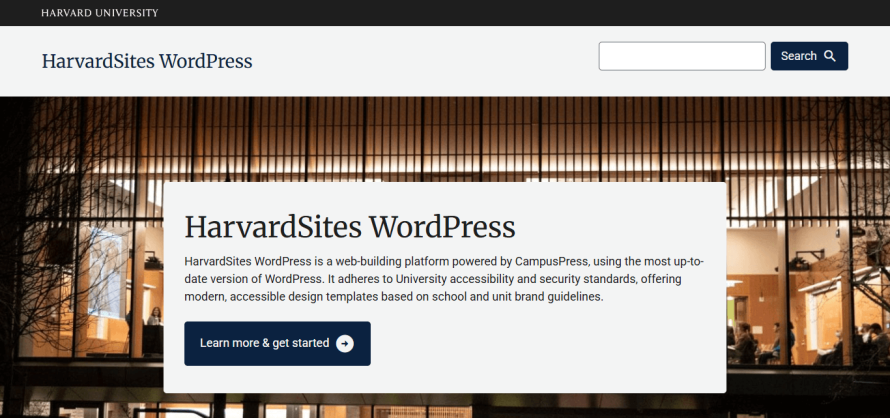
HarvardSites WordPress offers access to anyone with a Harvard email address and allows departments to maintain their own content while ensuring consistent branding and accessibility through a unified design system.
Also, the University of Texas operates the University Blog Service (UBS), which is a WordPress Multisite network serving various departments, student organizations and news blogs.
In the private sector, Campbell Soup Company runs all of its consumer brands on a single WordPress Multisite network, centralizing governance while allowing brand-level autonomy.
Large-scale and high-profile organizations also use Multisite at the enterprise level. NASA uses WordPress Multisite to manage NASA.gov and a small number of tightly governed sub-sites under a shared platform.
In the media sector, Ask Media Group uses WordPress Multisite to manage 11 high-traffic websites, including Ask.com and Reference.com. This network attracts 245 million unique visitors monthly and generates over 500 million page views.
Pantheon: Hosting for WordPress Multisite
Pantheon offers a powerful hosting solution specifically designed for WordPress, Drupal and Next.js sites. The platform is equipped with a range of tools that streamline development, enhance security and ensure scalability for WordPress Multisite installations:
- Pantheon’s Upstream architecture: Pantheon sets up a WordPress Multisite upstream that uses a specialized framework, including optimized Nginx configurations and other custom settings to enhance network performance. Pantheon’s team enables this custom upstream for you, allowing you to create new sites in your Multisite network with ease, all within your workspace.
- WebOps workflow: Pantheon also provides Dev, Test, Live environments for each Multisite network, with each environment running in an isolated container. This lets you develop, test and deploy changes without impacting the live site, streamlining the development process. Additionally, Multidev environments allow multiple developers to work in parallel on different features without conflicts, making it ideal for collaborative projects.
- Performance: Other features include built-in Git version control for smooth team collaboration, Redis object caching and Object Cache Pro for faster performance and automated daily backups. You also get a global content delivery network (CDN) powered by Fastly and free managed HTTPS certificates to ensure secure and fast content delivery.
- Infrastructure: Pantheon’s container-based infrastructure ensures rapid provisioning and high availability, automatically scaling to handle traffic spikes.
- Support: With Pantheon’s comprehensive support, including 24/7 assistance for higher-tier plans, your Multisite network will be well-equipped for growth and efficient management.
As you can see, Pantheon is an excellent choice for hosting WordPress Multisite networks, offering a professional-tier platform with enterprise-grade tools and scalability to support your digital ecosystem.
Start your journey with Pantheon today and see how easy it is to host and grow your WordPress Multisite network!
FAQs
Does using WordPress Multisite affect my hosting costs?
Yes, WordPress Multisite affects your hosting costs, but typically indirectly through resource consumption rather than a specific "Multisite license" fee. If you’re self-hosting on a VPS, dedicated server or cloud, the cost is based on resources such as CPU, RAM, storage and bandwidth. Since WordPress Multisite shares core files, themes and plugins across all sites, it’s more efficient than running separate installations.
However, the main cost driver is the database, as larger networks require a high-performance database server. Managed WordPress hosting providers may charge per install and some count subsites against your plan limit, forcing you to upgrade if you have many sites.
How many sites can you have on a WordPress Multisite?
Theoretically, there is no limit to the number of sites you can have on a WordPress Multisite network. Yet, it’s important to keep in mind that WordPress creates several database tables for each subsite and with thousands of sites, these can become performance bottlenecks if queries aren’t optimized. As the network grows, you may face challenges with table locking and database scaling, particularly with shared hosting or lower-tier VPS setups. That’s why large networks will require high-performance servers, custom configurations and expert optimization.
How do I manage plugins and themes across all the sites in my network?
Plugins and themes are managed centrally through the Network Admin dashboard. Network Admins can activate plugins and themes for the entire network, making them available to all sites.
For plugins, there are two methods: Network Activate (forcing a plugin to be active on all sites) or Site-Specific Activation (where individual site admins can choose to enable them). For themes, a Super Admin must first enable the theme at the network level to make it visible, after which individual sites can activate it as needed.
This centralized control gives you flexibility while ensuring that core resources are maintained consistently across your network.