
WordPress Multisite Setup and Configuration Tutorial
Image
Running multiple WordPress sites doesn’t have to mean managing separate logins, duplicate plugins and scattered updates. WordPress Multisite lets you publish and maintain many sites from one installation, making it easier to scale content, keep standards consistent and reduce operational overhead.
If you’re searching for practical steps to launch a WordPress Multisite confidently, you’re in the right place!
What is WordPress Multisite?
WordPress Multisite lets you manage multiple sites from a single WordPress installation. All sites share the same core files, themes and plugins, making updates simpler. Also, each site maintains its own content tables in a shared database. A Super Admin manages network-wide settings, while individual Site Admins control content.
Hosting requirements are higher than a standard WordPress install. For a stable Multisite setup, it is recommended to have at least 4GB RAM, high-frequency CPUs and PHP 8.3+ support. For optimal performance, use Redis or Memcached for caching and ensure generous PHP worker limits to avoid slow dashboards or timeouts.
The ideal environment for Multisite is high-tier managed WordPress hosting, like Pantheon, which handles caching, scaling and performance. Cloud VPS platforms are a good alternative if you're comfortable with configuration, but shared hosting should be avoided due to the risk of traffic surges overwhelming your network.
How to set up and install WordPress Multisite
Now that you know what Multisite is and when it makes sense to use it, let’s walk through how to enable it.
Converting an existing WordPress site or using a new install
Whether you’re converting an existing site to a Multisite or setting up Multisite on a brand-new WordPress install, the overall process is similar.
Before starting, it’s important to understand that converting an existing WordPress site to a Multisite is not always supported by hosting providers. For example, on Pantheon, you must configure Multisite at site creation to avoid breaking your environment. However, if your host supports conversions, proceed carefully.
In any case, here are the steps:
- Start by backing up your entire site and database so you can restore them if anything goes wrong.
- Deactivate all plugins if you're converting an already existing site – this avoids conflicts during setup and you can re-enable them later.
- Before installation, WordPress asks you to choose how new sites will be structured:
- Subdomains (site1.example.com).
- Subdirectories (example.com/site1).
For older sites (over 30 days old), WordPress forces subdomains to avoid URL conflicts.
- To enable Multisite, access your site files through an SFTP client (like FileZilla) or your hosting control panel and edit the wp-config.php file. Just above the “That's all, stop editing! Happy publishing.” comment, add:
define('WP_ALLOW_MULTISITE', true);
- Save and upload the file.
- Return to your WordPress dashboard and go to Tools > Network Setup.
- Give your network a name, set the administrator email and confirm your URL choice, then click Install.
- WordPress will display two blocks of code – one for wp-config.php and one for .htaccess. Paste each snippet into the appropriate file (replacing the existing rewrite rules in .htaccess).
- Once saved, log back in. You should see a new My Sites menu, which means your network is live.
- To create your first site, go to My Sites > Network Admin > Sites > Add New, then enter a site address, title and admin email. WordPress will generate the required tables automatically.
By the way, if manual conversion feels overwhelming, tools like All-in-One WP Migration (Multisite Extension) can automate database restructuring and reduce setup risk.
Can each site in a WordPress multisite network have its own unique domain name?
If you’re wondering whether each site can have its own unique domain, the answer is yes, Multisite fully supports this through domain mapping.
Domain mapping allows individual network sites to run on separate branded domains (e.g., brand1.com, brand2.org, examplestore.io) while still sharing one WordPress installation. This is especially useful for franchises, universities, publishers, or organizations managing multiple brands.
There are a few requirements to keep in mind:
- Each mapped domain must point to your multisite server via DNS (typically CNAME or A records).
- Every mapped domain needs its own valid SSL certificate or must be covered under a multi-domain certificate to avoid security warnings.
- You assign the unique domain to the subsite inside the Network Admin dashboard – then WordPress routes traffic correctly.
Multisite setup on Pantheon
Pantheon is more than a hosting provider – it’s a WebOps platform designed to help teams build, deploy and scale WordPress, Drupal and Next.js sites with governance, automation, performance and security baked in.
Multisite fits naturally on Pantheon because the platform already supports multiple website portfolios, role-based access, version control and scalable infrastructure. However, it isn’t enabled the same way it is on typical WordPress hosts. You don’t turn it on in wp-config.php – you must request a Multisite-specific Upstream from Pantheon first, and you have to be on a Gold, Platinum or Diamond level Workspace Plan. This upstream includes network-specific configurations – especially Nginx rules – that Multisite depends on to function reliably.
Image
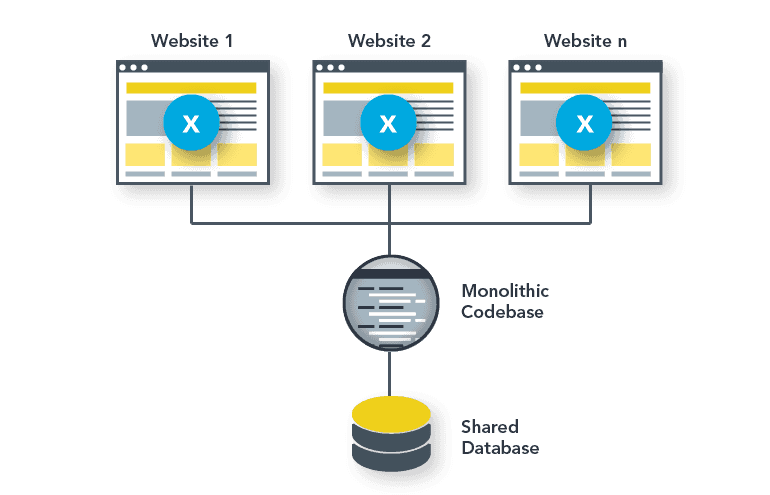
Once the Multisite Upstream is enabled, you create a new Pantheon site using the WordPress Multisite upstream created for you. This is important because there is a unique server configuration for Multisites on Pantheon that is different from standard WordPress installs. If you’re migrating an existing installation, you spin up a new Multisite instance and move your code, database and media into it manually.
This is ideal for organizations that need central governance, shared branding or unified login experiences. And, if you’re dealing with unrelated customer sites, Pantheon’s Upstreams give you shared code management benefits while deploying each site as its own WordPress instance for isolation and resiliency.
How to maintain WordPress Multisite
Maintaining a WordPress Multisite network is more involved than managing a single site because it’s possible that one configuration mistake or security issue can affect every site connected to your network. The goal is to think in terms of network health, rather than treating each site independently.
Start with update management. Because all subsites share the same WordPress core, plugins and themes, apply updates thoughtfully – always test in a staging environment first. Running the latest WordPress version ensures you receive important multisite fixes and performance improvements introduced in recent versions.
Security begins with SSL enforcement. Every site – and every mapped domain – must run over HTTPS. If you’re using subdomains, a wildcard SSL certificate covers them all. If each site has its own custom domain, each one needs its own SSL certificate or a multi-domain SSL option. Set expiry alerts so certificates don’t lapse silently. On Pantheon, HTTPS is handled automatically, so you won’t need to provision, renew or monitor SSL certificates yourself.
Backups must be treated as mission-critical. Automated host backups are useful, but maintain your own off-site backups too. Include site files, the shared database and configuration files – and regularly test your ability to restore those backups.
Because all sites share one database, performance tuning is essential. Clean post revisions, purge spam/trash comments, remove unused themes/plugins and optimize tables regularly. Tools like WP-Optimize can automate this and caching layers like Redis dramatically reduce database load in growing networks.
User access governance matters too. Limit Super Admin permissions to trusted technical personnel, enforce the principle of least privilege, conduct quarterly access reviews and enable 2FA for administrator accounts. Plugins like Multisite User Management help maintain control across many subsites.
Additionally, plugin and theme oversight is another core discipline. Super Admins should control which plugins and themes are available network-wide and network-activate only what truly needs to run everywhere. Unused plugins should be removed to reduce attack surfaces.
Monitoring rounds out your maintenance plan – watch SSL expiry, track uptime, review logs for suspicious activity and monitor database performance before issues escalate.
A simple network maintenance routine includes updating software, validating SSL, testing backups, optimizing the database, reviewing permissions and monitoring overall performance. Treat Multisite as a shared ecosystem – not separate sites – and it remains secure, fast and scalable as your network grows.
How Pantheon elevates your WordPress Multisite
Pantheon’s container-based infrastructure isolates application workloads and scales horizontally. If a single subsite suddenly attracts huge traffic – like a university admissions deadline or a campaign launch – Pantheon can spin up extra containers automatically. This prevents one spike from crippling your entire network, something shared hosting and VPS environments struggle with.
Additionally, Pantheon enforces structured WebOps through Dev, Test, Live environments. You can test updates, plugins or new features in a safe copy of your site before releasing them to production, which is vital when a change could affect dozens or hundreds of sites. Along with this, Multidev environments allow teams to build features in parallel without stepping on each other’s work.
Pantheon also elevates management with tooling like Terminus and Quicksilver Automation. These let you script network-wide operations, run WP-CLI commands across every site or trigger automatic maintenance tasks after deployments – dramatically reducing manual network administration.
And when it comes to performance, Pantheon provides:
- Advanced Page Cache to ensure cache purges only affect the correct site.
- Redis object caching and Object Cache Pro to reduce database stress.
- Global CDN to accelerate delivery for every subsite equally.
As you can see, Pantheon elevates Multisite by combining automation, scalable infrastructure and secure workflows.
Enhance your WordPress Multisite today!
WordPress Multisite unlocks efficiency, centralized control and scalability – but it succeeds only when paired with the right architecture, workflows and hosting strategy. Whether you’re managing departments, franchises or a portfolio of brands, a thoughtfully configured network can reduce overhead, streamline updates and support growth without multiplying effort.
Pantheon takes Multisite further by providing containerized performance, automated workflows, team governance and dependable scaling – turning complex networks into reliable digital ecosystems.
If you want faster deployments, safer updates, better uptime and a platform built for growing multisite portfolios, it’s time to upgrade your foundation.
Launch your Multisite on Pantheon and elevate the way you build, manage and scale your WordPress network!