
Tools vs Multisite for Managing Multiple WordPress Sites
Image
Managing multiple WordPress sites gets complicated fast. What starts as a few separate installs can turn into dozens of logins, inconsistent plugin versions, missed updates, unclear backup status and growing security risk. The more sites you add, the harder it becomes to keep everything aligned and under control.
If you’re trying to figure out the best way to manage multiple WordPress sites, you’re really deciding how much control, flexibility and automation your setup should have as you grow.
In this guide, we’ll break down the main approaches teams use, what each one actually solves, where the tradeoffs show up and how to choose a structure that won’t create problems later.
Four ways to manage multiple WordPress sites
There isn’t one universal way to manage multiple WordPress sites. The right approach depends on how independent your sites need to be, how much control you want over infrastructure and code, and whether you’re optimizing for convenience or long-term scalability. Most teams end up choosing one of four models:
- Third-party management tools: These are external platforms that connect to your existing WordPress installs via plugins. They centralize updates, backups, uptime monitoring and security checks into a single dashboard, without requiring you to migrate hosting. They focus on operational efficiency at the site level.
- WordPress Multisite: Multisite is a built-in WordPress feature that allows multiple sites to run from a single WordPress installation. Sites share the same core files and database structure, but can have separate content and configurations. This model tightly couples sites together at the application level.
- Hosting dashboards: Many managed WordPress hosting providers offer dashboards that let you oversee multiple sites within their infrastructure. These typically include backups, staging environments and performance monitoring – but only for sites hosted on that provider’s platform.
- Platform-level WebOps: This approach operates at the infrastructure and workflow level rather than the plugin layer. Instead of simply listing sites in a dashboard, it centralizes code governance, environments, deployment workflows and security policies across a portfolio of sites. It’s designed for teams that treat WordPress as an operational system, not just individual installs.
We’ll unpack all the details of these four approaches in the coming sections.
Key features to look for
Before comparing specific approaches, it’s important to step back and define what “good” looks like for your business.
Not every team needs the same capabilities. An agency managing 40 client sites has different priorities than a marketing team running five brand microsites. The key is to identify which features matter most to you and then make sure the solution you choose actually supports them.
Here are the core capabilities most teams look for when managing multiple WordPress sites:
- Centralized dashboard: This is your control center. Instead of logging into each WordPress admin panel individually, you should be able to see site health, update status, backup history and alerts in one place. The real value is visibility. When something goes wrong, you should know immediately which sites are affected and what changed.
- Bulk updates: Updating plugins and themes across dozens of sites one by one is time-consuming. Bulk update functionality allows you to apply changes across multiple installs at once. However, speed should be balanced with safety. Ideally, updates can be staged or tested before being pushed everywhere to avoid widespread breakage.
- Automated backups: Backups are non-negotiable at scale. Look for scheduled backups (daily at minimum), off-site storage and simple restore workflows. When managing multiple sites, the ability to quickly roll back a single site, without affecting others, is critical.
- Security monitoring: As your number of sites increases, so does your attack surface. Security monitoring should include vulnerability detection for outdated plugins, malware scanning and clear alerts. Passive security isn’t enough – you need proactive signals when risk appears.
- Uptime monitoring: Even short outages can damage trust and SEO performance. Automated uptime checks notify you when a site becomes unavailable, so you can respond before clients or users notice.
- Client reporting: If you manage sites for others, reporting is how you demonstrate value. Clear, white-label reports showing updates performed, backups completed and security checks passed turn maintenance into a visible service – not invisible work.
Third-party management tools
Third-party management tools connect to your existing installs – regardless of hosting provider – through a plugin and centralize maintenance tasks into one dashboard. There’s no migration required. You simply connect your sites and begin managing them from a single interface.
Popular options include ManageWP, WP Umbrella, MainWP and InfiniteWP. While each differs slightly in interface and pricing model, they generally provide the same core capabilities:
- Bulk updates for WordPress core, plugins and themes.
- Scheduled backups with restore options.
- Uptime monitoring.
- Basic security scanning.
- Alerting when something breaks.
Instead of logging into 20 separate wp-admin panels, you manage everything from one place.
Also, for agencies, client reporting is a major advantage. Tools like ManageWP and WP Umbrella offer white-label reports that summarize updates, backups, uptime and security checks. These reports make maintenance visible and help demonstrate ongoing value to clients.
However, when a single dashboard controls dozens of sites via third-party tools, it becomes a potential single point of compromise. A leaked API key, weak credentials or a vulnerability in the management tool could expose multiple installs. However, this isn’t unique to Multisite – any setup that relies on centralized credentials or automation to manage multiple environments carries similar risks. That’s why basic mitigations like strong passwords, multi-factor authentication, limited access permissions, and regular credential rotation are essential.
Keep in mind that third-party tools focus primarily on site-level maintenance. They make independent sites easier to maintain, but they don’t fundamentally change how those sites are built, deployed or governed.
Pricing models: SaaS vs self-hosted
In terms of pricing, SaaS-based tools like ManageWP and WP Umbrella typically charge per site or per feature tier. Costs often start modestly per site per month, with additional fees for advanced backups, reporting or performance monitoring.
Self-hosted tools like MainWP and InfiniteWP take a different approach, where you host the management dashboard yourself. This can be more cost-effective at scale, but it shifts responsibility for maintaining the management system onto you.
WordPress Multisite – what is coupled?
WordPress Multisite is a built-in WordPress feature that allows you to run multiple sites from a single WordPress installation. Instead of managing separate installs, you manage a network. Each site has its own content and settings, but they all live inside one shared system.
In a Multisite network, several components are shared at the application level. There is one WordPress core codebase, one set of themes and plugins (network-installed), and one database with site-specific tables under a shared structure. Updates to core, themes, or network-enabled plugins affect every site that relies on them.
This coupling can be powerful. It ensures consistency across sites, reduces duplication and makes it easier to standardize functionality. But it also means changes are rarely isolated. A plugin conflict, version upgrade, or architectural change can ripple across the entire network.
Benefits of Multisite
Here are the benefits of Multissite in a nutshell:
- Simplified management when sites are closely related: You maintain a single WordPress core, install plugins once, update themes once, and manage users from one network admin instead of repeating the same tasks across separate installs.
- Reduced duplication for setup across similar sites: Organizations running regional sites, language variations or multiple brand microsites with the same architecture don’t need to recreate the same configuration over and over. Shared functionality lowers operational overhead.
- Built-in consistency and governance: If every site needs to run the same approved theme or plugin stack, Multisite makes that governance easy to implement. Standards are applied centrally, not negotiated site by site.
Fit and misfit criteria
Multisite works best when sites share the same owner, similar functionality and minimal long-term divergence. If you’re running multiple brand sites under one organization and expect them to evolve together, Multisite can be efficient.
In client environments, highly customized builds or portfolios where sites may need to diverge significantly over time, Multisite requires careful planning and architecture. Without that forethought, heavy plugin stacks can increase the risk of conflicts. And if a site might need to become independent later, Multisite can introduce additional complexity.
Important note to keep in mind for Multisite
Migrating a site out of Multisite is generally possible and can be straightforward with the help of available tools. It's actually harder to move a site into a Multisite network, though it's not impossible.
Hosting dashboards: What they can and cannot do
Another common way to manage multiple WordPress sites is through your hosting provider’s dashboard. Platforms WP Engine and Kinsta offer centralized views of the sites hosted within their infrastructure.
When all your sites live on the same provider, hosting dashboards can be convenient. You typically get a clean overview of backups, staging environments, performance metrics, SSL status and sometimes plugin updates. Spinning up new sites is fast, and support is unified under one vendor.
For teams that value consolidation and simplicity, this model works well. Everything is in one place – billing, infrastructure and site management.
However, there are drawbacks to this approach:
- Limited scope: Hosting dashboards primarily manage infrastructure and site-level settings within that provider’s ecosystem. They are not designed for cross-provider portfolios, which can create vendor lock-in over time.
- No centralized code governance across multiple sites: Git-based workflows, one-to-many code propagation and portfolio-level deployment management are often limited or inconsistent. Updates still happen per site rather than from a single governed codebase.
Overall, hosting dashboards are strong at managing sites that already live within one hosting environment. But they don’t fundamentally solve multi-site code governance or advanced development workflows, especially for teams operating at scale.
Platform-level WebOps with Pantheon
Platform-level WebOps treats your WordPress portfolio as a governed system with shared code standards, controlled deployments and structured workflows across environments. Instead of asking “How do I update 30 sites faster?”, the question becomes “How do I manage code, testing and risk across 30 sites consistently?”
This is where Pantheon operates differently from traditional hosting dashboards.
Upstreams (one-to-many code propagation)
Pantheon’s Upstreams allow you to maintain a centralized codebase – for example, a shared theme, plugin set or configuration – and push updates across multiple sites in a controlled way. Updates are made in the upstream and then applied to individual sites as needed. This is fundamentally different from bulk plugin updates, which apply changes independently per site without shared governance.
Multidev (isolated testing environments)
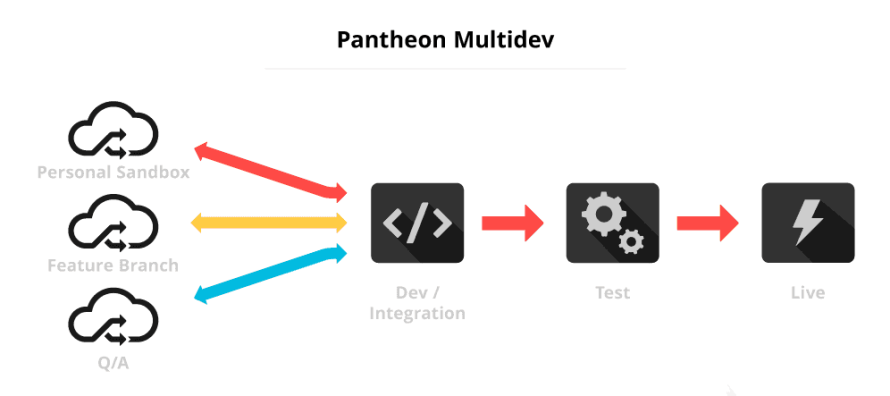
With Multidev, each site can have multiple isolated development environments. Teams can test updates, experiment with changes or validate features in parallel without affecting production. This reduces the risk of pushing untested updates live – something traditional management tools don’t address.
Image
Autopilot (visual regression testing before deployment)
Pantheon Autopilot goes beyond “click and update.” It automatically applies updates in a safe environment and performs visual regression testing to detect layout or UI breakage before changes reach production. Traditional bulk updates are essentially blind – they apply updates and hope nothing breaks. Autopilot adds verification before deployment.
Security and access
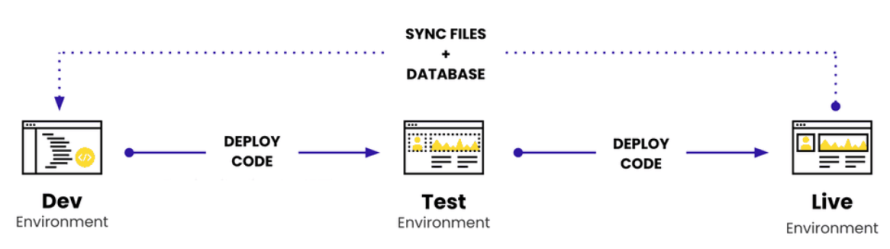
Pantheon’s enterprise-level security strengthens access control and security governance. While teams still require wp-admin access for site-level administration and content management, Pantheon centralizes platform access through role-based permissions in its workspace dashboard. This allows organizations to manage who can access environments, code and infrastructure across a portfolio of sites from a single control plane. Code changes flow through structured Dev → Test → Live environments, reducing the likelihood of direct production edits.
Image
Because governance happens at the platform and code layer, not just through a monitoring dashboard, WebOps with Pantheon is designed for teams that need consistency, controlled deployments and portfolio-level oversight as they scale.
It’s not just about seeing all your sites in one place. It’s about managing how they evolve safely and systematically.
Choosing your path forward
At a small scale, almost any setup works. You can log into each site, run updates and move on. But as the number of sites grows, the cost of small inefficiencies compounds. One missed update becomes a vulnerability. One untested change becomes downtime. One inconsistent codebase becomes long-term technical debt.
If your portfolio is growing with multiple brands, campaigns, regions and client properties, maintenance tools alone won’t solve the underlying complexity. You need shared code control, safe testing environments and deployment workflows designed for scale.
That’s exactly what Pantheon is built for. With Upstreams, Multidev and Autopilot, Pantheon gives you centralized governance without sacrificing flexibility.
Start with Pantheon today and manage multiple WordPress sites with consistency, control and confidence!