
Should You Use WordPress as a Headless CMS
WordPress has traditionally handled both content management and frontend rendering. A headless architecture changes that. WordPress becomes the content repository, while a separate frontend – often built with frameworks like Next.js – delivers the user experience through APIs.
So if you’re wondering whether the benefits of decoupling outweigh the added operational overhead for your project, this guide will help you decide.
Image
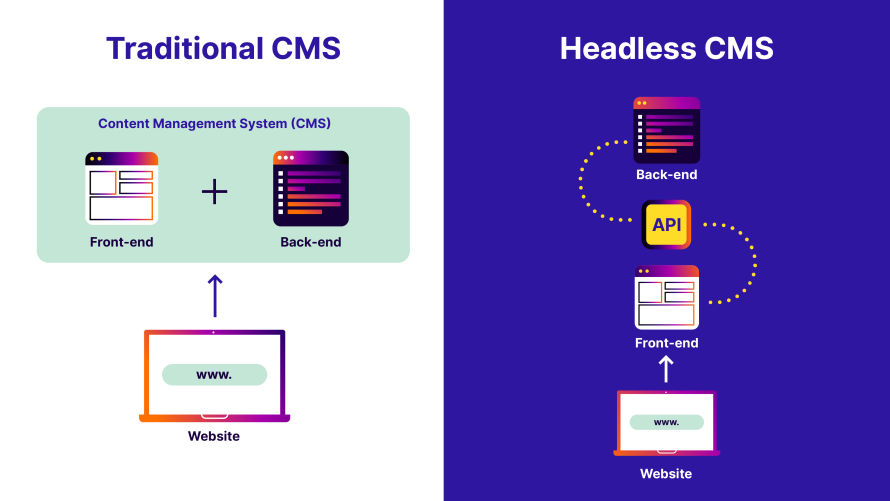
What you gain from decoupling WordPress
Here are the biggest advantages of a headless WordPress setup:
- Frontend flexibility: Decoupling WordPress removes the dependency on the theme layer. Instead of building within the constraints of PHP themes and templates, developers can use modern frameworks such as Next.js, React, Vue or other frontend technologies. This provides greater control over routing, rendering, state management, personalization and user experience design.
- Omnichannel delivery: In a headless architecture, WordPress becomes a centralized content repository rather than a website renderer. The same content can be delivered through APIs to websites, mobile applications, customer portals, digital displays and other digital touchpoints without duplicating content management workflows.
- Better performance opportunities: Headless frontends can use modern rendering strategies such as static site generation (SSG), server-side rendering (SSR) and incremental static regeneration (ISR). Combined with CDN and edge delivery, this can significantly reduce page load times and improve Core Web Vitals compared to a traditional dynamically rendered WordPress site.
- Independent development workflows: Frontend and backend teams can work more independently. Content model changes in WordPress and frontend application development can evolve on separate release cycles, making it easier for larger teams to scale development efforts without creating bottlenecks.
- Security: A headless setup doesn’t make WordPress automatically secure, but it can reduce exposure when authentication, API permissions, caching, updates and hosting controls are configured properly. The CMS can sit behind stricter access controls, while the frontend serves API-fed content separately.
What you lose by going headless
Before going headless, it's important to understand what you're giving up in exchange for greater flexibility:
- Plugin compatibility: Not every plugin is designed to expose its data through APIs. Plugins that work perfectly in a traditional WordPress theme may require custom API integrations, additional development work or replacement solutions when used in a headless stack.
- Out-of-the-box content previews: In a traditional WordPress site, editors can preview unpublished content immediately. With a decoupled frontend, preview functionality often has to be rebuilt using API endpoints, authentication tokens and custom frontend logic. While achievable, it is no longer automatic, though frameworks such as HWP Previews or 10up's HeadstartWP can simplify the implementation of preview functionality.
- Development simplicity: What was once a single WordPress site becomes an ecosystem of APIs, frontend applications, deployment pipelines and integration points that your team must build and maintain.
None of these tradeoffs makes headless WordPress a bad choice. They simply change the nature of the work. You're replacing the constraints of a monolithic platform with the responsibilities of a distributed system. For the right project, that exchange is worthwhile. For the wrong project, it can introduce complexity without delivering meaningful business value.
The real cost of going headless
WordPress, the REST API and even many headless development tools are open source and free. But the software license is rarely the biggest expense in a headless project.
A traditional WordPress site typically requires one hosting environment. A headless implementation requires at least two: one for WordPress and one for the frontend application. So the real costs come from the additional architecture required to run and maintain these two applications:
- Discovery and architecture: Before development starts, you need to define content models, API strategy, routing, preview behavior, caching rules, deployment workflows and ownership between WordPress and the frontend. Skipping this step usually creates expensive rework later.
- The maintenance costs: Headless WordPress adds ongoing work around API changes, dependency updates, cache invalidation, preview reliability, frontend build failures, monitoring and security. A content model change in WordPress can break the frontend if the API contract is not managed carefully.
- The people costs: Headless requires more than WordPress knowledge. Teams need frontend framework experience, API design, DevOps, QA and enough operational maturity to troubleshoot across systems. For many organizations, this becomes the largest cost center.
This doesn't mean headless is always more expensive. For organizations operating multiple digital channels, managing large content estates or requiring highly customized frontend experiences, the additional investment can produce meaningful returns in flexibility, performance and scalability.
The hosting choice is particularly important because it directly affects how much complexity your team inherits. Many organizations start by hosting WordPress on one platform and their frontend on another. While functional, this often creates fragmented workflows, separate support teams, disconnected environments and duplicated operational processes. But Pantheon addresses these challenges directly.
Rather than treating the backend and frontend as separate systems, Pantheon provides a unified platform experience for WordPress and Next.js. Teams can manage environments, deployments, workflows and governance through a consistent operational model instead of stitching together multiple providers.
SPS Commerce demonstrates the value of this approach. The company was running a large Next.js property alongside its WordPress ecosystem, creating separate operational processes across roughly 1,600 pages in five languages. By moving the Next.js application to Pantheon, SPS Commerce consolidated WordPress and Next.js onto a single platform, completed the migration in eight days and gave both developers and content teams the same Dev, Test, Live workflow across the entire stack.
Image
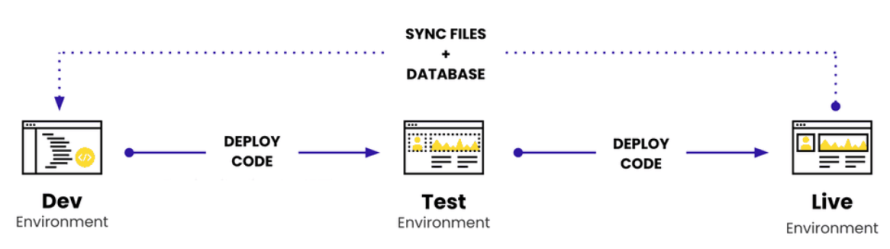
The key takeaway is that the most successful headless implementations are usually the ones that minimize complexity from the start.
How to decide if headless WordPress fits your project
Headless WordPress is neither the future of every WordPress site nor an unnecessary architectural trend. It's a specific solution to a specific set of problems. The easiest way to evaluate it is to start with your requirements rather than the technology itself.
Headless WordPress is often a strong fit when you need:
- A highly customized frontend experience that would be difficult to build and maintain within a traditional WordPress theme.
- Multiple digital channels consuming the same content, such as websites, mobile apps, customer portals, kiosks or digital signage.
- Independent frontend and backend development teams that need separate release cycles and workflows.
- Modern application architecture built around frameworks like Next.js, React, Vue or Astro.
- Large-scale content operations where content modeling and API-driven delivery are more important than theme-based rendering.
On the other hand, a traditional WordPress implementation is often the better choice when:
- The primary goal is publishing content to a website, not powering multiple channels.
- Editors need maximum simplicity with minimal custom workflows.
- The site relies heavily on frontend-oriented plugins, themes or page builders.
- Development resources are limited and long-term maintainability is a priority.
- The business problem can already be solved effectively with WordPress's native capabilities.
Ultimately, headless WordPress should be treated as an architectural decision, not a default best practice. The most successful projects adopt it because they have requirements that genuinely benefit from decoupling – not because the technology itself is popular. When the problem and architecture align, WordPress can be an exceptionally effective headless CMS. When they don't, simplicity often wins.
The path forward if you choose headless WordPress
Choosing a headless architecture is only half the decision. The other half is choosing a platform that makes that architecture easier to build, deploy and maintain.
That's where Pantheon delivers its biggest value.
Pantheon is one of the few platforms designed to host both WordPress and Next.js under one roof, giving teams a unified foundation for modern web development. Other than that, you get:
- Content Publisher for near-real-time updates: Headless sites often struggle with content freshness. Pantheon's Content Publisher can automatically trigger frontend updates when content changes in WordPress, helping teams avoid unnecessary full-site rebuilds.
- Container-based architecture and enterprise scalability: Pantheon's containerized infrastructure is designed to scale with traffic demands while isolating applications for reliability and security. This allows teams to focus on building experiences rather than managing servers, capacity planning or infrastructure scaling events.
- Multidev environments for parallel development: Developers can spin up isolated environments for new features, redesigns, experiments or stakeholder reviews without affecting other workstreams. This is particularly valuable when frontend and backend teams are working independently.
- GitHub integration to simplify DevOps: Pantheon integrates directly with GitHub, enabling automated deployments and streamlined development workflows. This reduces the amount of custom DevOps tooling and deployment automation teams need to build and maintain.
Launch a Next.js and WordPress project on Pantheon today and see how much simpler modern web operations can be when your CMS and frontend are built to work together!
FAQs about using WordPress as a headless CMS
How does headless WordPress compare to a native headless CMS like Strapi?
WordPress is often better when teams want a familiar editorial interface, mature publishing workflows, user roles, media management and a large plugin ecosystem.
A native headless CMS like Strapi may be better for projects that are API-first from the start. However, it may require teams to recreate editorial workflows that WordPress already provides.
Do WordPress SEO plugins still work in a headless setup?
SEO plugins can still be useful, but they do not automatically control the frontend as they do in a traditional WordPress theme. They may store titles, meta descriptions, canonical URLs, schema and Open Graph data in WordPress, but the Next.js frontend must fetch and render that metadata correctly. Redirects, sitemaps, robots rules and structured data also need to be handled intentionally.
What are common mistakes when migrating from traditional WordPress to Next.js?
Common mistakes include treating the migration as only a frontend redesign, failing to preserve URLs, forgetting 301 redirects, not mapping SEO metadata, assuming plugins will work unchanged and underestimating preview functionality. Teams also often overlook cache invalidation, analytics, form handling and content model changes that can break the frontend.
A successful migration should start with a content audit, plugin audit, URL mapping plan, SEO migration plan and preview strategy before development begins.
What happens to the WordPress editor and live preview in headless WordPress?
Editors can usually keep using the WordPress admin, block editor, media library, categories, tags, custom fields and publishing workflows. However, live preview does not work automatically the same way it does with WordPress themes. In a headless setup, preview usually needs to be rebuilt in the frontend using preview routes, authentication, draft content access and rendering logic. The editor can stay familiar, but preview accuracy requires planning and implementation.