
How Headless WordPress and REST APIs Power Modern Web Apps
Image
The WordPress REST API lets you read and write site data using standard HTTP requests. You send a request, you get JSON back. You don’t need to fiddle with PHP templates or admin-ajax callbacks.
If you just want to fetch posts into your headless React front end, you don't need to learn WordPress internals. If you've been building with admin-ajax, this is the modern replacement. Both paths lead to the same endpoints.
We’re here to get you started with working code. GET requests with filtering and pagination, POST requests that create content, reusable authentication patterns for curl or API clients and custom endpoints with proper validation.
We'll also cover what trips people up in production. Think data and caching issues like stale cached responses and exposed user endpoints. Security and platform issues like auth methods that fail on most hosts and secrets hard-coded into your repo.
Common WordPress REST API examples
Every request hits the API root at yoursite.com/wp-json/wp/v2/. Core WordPress resources live under the /wp/v2/ namespace, so posts end up at https://yoursite.com/wp-json/wp/v2/posts. Other plugins register their own namespaces, like https://yoursite.com/wp-json/yoast/v1.
What comes after depends on the resource you want and the HTTP method you use.
Retrieving data with GET requests
GET requests are public by default. Authentication isn’t necessary for published content. You can test these directly in your browser – append any endpoint to your base URL and you'll see raw JSON.
Let’s look at TechCrunch as an example. The site is built using WordPress, and this is what you’ll get if you append wp-json/wp/v2/ to its URL:
Image
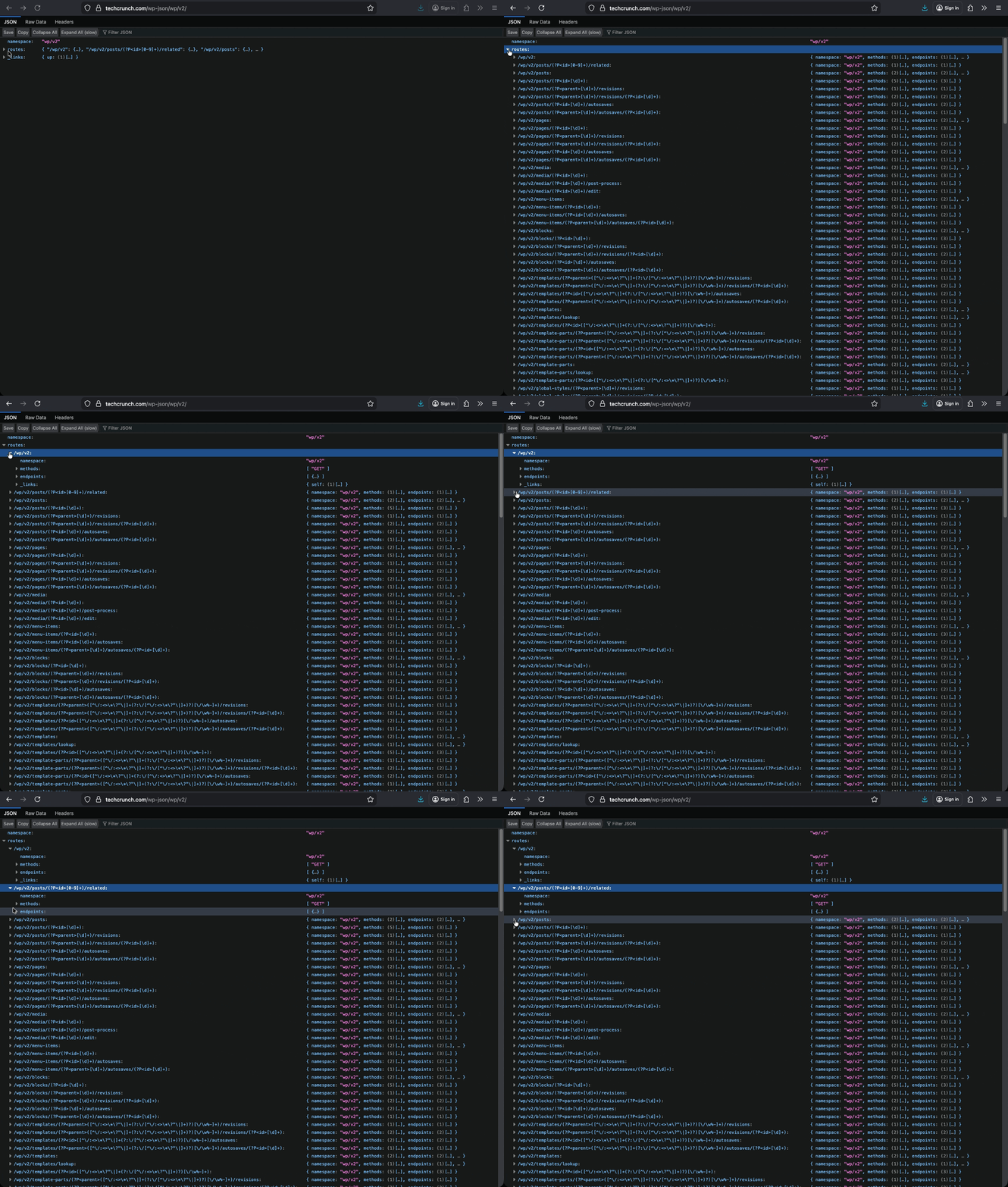
A browser extension like JSON Formatter makes the response readable.
With that foundation, we can start going over some concrete examples.
The simplest request fetches all posts:
GET /wp-json/wp/v2/posts
That returns a lot of data. The _fields parameter trims the response to only what you need:
GET /wp-json/wp/v2/posts?_fields=id,title,slug
You can also paginate and sort. This fetches five posts per page, starting at page two, ordered alphabetically by title:
GET /wp-json/wp/v2/posts?per_page=5&page=2&orderby=title&order=asc
Filter by author using their user ID:
GET /wp-json/wp/v2/posts?author=12
Pages work the same way as posts. Just swap the endpoint:
GET /wp-json/wp/v2/pages
The default limit is 100 items per request. You can push this to 500 with per_page, but you might need a custom WordPress filter hook to avoid a 400 Bad Request error. Smaller payloads usually perform better.
Creating, updating and deleting data with authenticated requests
Writing data requires authentication. Without it, these requests return a 401 error. We'll cover auth methods in the next section. For now, though, assume you're passing valid credentials.
To create a new post, send a POST request with your content as JSON:
POST /wp-json/wp/v2/posts
Content-Type: application/json
{
"title": "My New Post",
"content": "The post body goes here.",
"status": "draft"
}
Set status to publish if you want it live immediately.
Updating an existing post works similarly. You need the post ID in the URL:
POST /wp-json/wp/v2/posts/42
Content-Type: application/json
{
"title": "Updated Title"
}
You only send the fields you want to change. Everything else stays intact.
Deleting a post moves it to the trash by default:
DELETE /wp-json/wp/v2/posts/42
To skip the trash and delete permanently, add the force parameter:
DELETE /wp-json/wp/v2/posts/42?force=true
This pattern applies across resources. Pages, media, users – they all follow the same structure. Just change the endpoint, but keep the method.
Advanced API usage
The basics get you reading and writing data. Production apps need more: solid authentication, error handling, caching and security hardening.
Authentication methods
WordPress supports several authentication approaches. The right choice depends on where your code runs:
- Cookie authentication works automatically when you're logged into WordPress. The admin dashboard and block editor use this. It’s meant for same-origin requests only.
- Application Passwords are the simplest option for external tools. Generate one in your WordPress user profile under Users > Your Profile > Application Passwords. Pass it with your username in the Authorization header:
Authorization: Basic base64(username:application_password) - JWT (JSON Web Tokens) works well for decoupled front ends. You request a token once, then include it in subsequent requests. WordPress doesn’t support this natively, so you’ll need a plugin like JWT Authentication for WP REST API.
- OAuth 1.0a suits enterprise scenarios with multiple clients. It’s more complex to implement but offers granular permission scopes.
- Basic Auth should stay in development. Many hosts disable it entirely. Security plugins block it. Don't plan around it for production.
Handling errors
The API returns standard HTTP status codes. Learn to read them:
- 200 means success.
- 201 means a resource was created. These are what you want.
- 400 means your request was malformed. Check your JSON syntax.
- 401 means you're not authenticated. Your credentials are missing or wrong.
- 403 means you're authenticated but lack permission. The user doesn't have the right capabilities for that action.
- 404 means the resource doesn't exist. Wrong endpoint or wrong ID.
- 500 means something broke server-side. Check your PHP error logs.
Error responses include a JSON body with details:
{
"code": "rest_cannot_edit",
"message": "Sorry, you are not allowed to edit this post.",
"data": {
"status": 403
}
}
Parse the code field programmatically. It's more reliable than the message, which can change between WordPress versions or translations.
When building custom endpoints, return WP_Error objects for failures. They automatically convert to properly formatted JSON responses:
return new WP_Error(
'invalid_author',
'Author ID does not exist',
array( 'status' => 400 )
);
Using caching
REST API responses aren't cached by default. Every request hits the database. On high-traffic sites, this becomes a problem fast.
For server-side caching in PHP, use the transients API:
$posts = get_transient( 'cached_posts' );
if ( false === $posts ) {
$posts = wp_remote_get( rest_url( 'wp/v2/posts' ) );
set_transient( 'cached_posts', $posts, HOUR_IN_SECONDS );
}
This stores the response for an hour. Adjust the duration based on how often your content changes.
The problem is invalidation. When a post updates, your cached data goes stale. You need to delete the transient when content changes:
add_action( 'save_post', function() {
delete_transient( 'cached_posts' );
});
Object caching with Redis or Memcached performs better than database-backed transients at scale. If a persistent object cache is installed, transients are stored there as well instead of in the database.
Plugins like WP REST Cache handle this automatically. They intercept API responses and serve cached versions until content changes.
For headless architectures, caching gets more complex. Your front end, CDN and WordPress might all cache responses.
When a post updates, all those layers need to know. Surrogate keys and cache tags help a ton here – we'll cover them later on.
API security
The REST API exposes data by default. That's intentional. It powers the block editor and many plugins. Disabling it entirely breaks things. Instead, restrict specific endpoints selectively.
The /wp-json/wp/v2/users endpoint is the common concern because it lists usernames.
Of course, usernames are often exposed elsewhere, like author archive URLs and feeds. As such, restricting this endpoint alone doesn’t eliminate public visibility. However, if usernames are email addresses – such as in some SSO setups – the risk is higher.
You can restrict it to authenticated users only:
add_filter( 'rest_endpoints', function( $endpoints ) {
if ( ! is_user_logged_in() ) {
if ( isset( $endpoints['/wp/v2/users'] ) ) {
unset( $endpoints['/wp/v2/users'] );
}
if ( isset( $endpoints['/wp/v2/users/(?P<id>[\d]+)'] ) ) {
unset( $endpoints['/wp/v2/users/(?P<id>[\d]+)'] );
}
}
return $endpoints;
});
Be careful here. Headless front ends often need user data for author pages. Test thoroughly before deploying.
For custom endpoints, always add permission callbacks:
register_rest_route( 'myplugin/v1', '/data', array(
'methods' => 'GET',
'callback' => 'my_callback',
'permission_callback' => function() {
return current_user_can( 'edit_posts' );
}
));
Never skip the permission callback. An empty callback will trigger a developer warning and is a major security risk. This is because it might allow unauthorized access by defaulting to granting all permissions when no validation logic is present.
Use HTTPS for all API traffic. Credentials pass through headers. Without encryption, they're visible to anyone watching the network.
Making the API faster
Slow API responses usually come from one of four places: the database, unoptimized queries, bloated responses, or server resources.
Start with the response payload. The _fields parameter is your first optimization. Requesting twenty fields when you need two wastes bandwidth and processing time:
GET /wp-json/wp/v2/posts?_fields=id,title,link
Database queries are the next bottleneck. Complex meta queries and taxonomies add overhead. If your custom endpoint runs slow, profile the SQL with Query Monitor. Index the columns you filter on.
Bring down PHP execution time by auditing the plugins that run on REST requests. Performance issues usually come from specific plugins that addheavy queries or global hooks, not necessarily the total number of plugins installed.
Keep WordPress updated to the latest stable release. Core updates regularly include performance improvements to queries, caching behavior and REST responses.
OpCode caching (like with OPcache) prevents PHP from recompiling on every request. Enable it in production and configure it with enough memory to cache your entire codebase.
For API-heavy sites, consider persistent object caching with Redis. Database queries that run repeatedly get served from memory instead. The difference in response times should be measurable.
Finally, put a CDN in front of your API. Cache GET requests at the edge. Requests never hit your server until the cache expires.
Creating a headless setup with WordPress REST API
Headless WordPress separates the backend from the front end. WordPress manages content. A JavaScript framework handles presentation. The REST API connects them.
This architecture makes sense when your front-end team prefers React, Vue, or Next.js over PHP templates. It also works for multi-channel publishing: the same API can feed a website and mobile app, as well as digital signage.
A basic Next.js implementation fetches posts at build time:
export async function getStaticProps() {
const res = await fetch('https://yoursite.com/wp-json/wp/v2/posts');
const posts = await res.json();
return {
props: { posts },
revalidate: 60
};
}
The revalidate parameter enables incremental static regeneration. Pages rebuild automatically when the cache expires.
For authenticated requests from a Node environment, pass Application Passwords in the header:
const credentials = Buffer.from('username:app_password').toString('base64');
const res = await fetch('https://yoursite.com/wp-json/wp/v2/posts', {
headers: {
'Authorization': `Basic ${credentials}`
}
});
Store credentials in environment variables. Never commit them to your repository.
Because WordPress no longer renders the front end, the trade-off with headless is complexity. Out of the box, you lose WordPress preview functionality and have to work to rebuild it. The same is also true for some SEO plugins. Caching also requires more deliberate architecture.
The right host could make all the difference in a setup like this.
Hosting your headless site on Pantheon
Headless WordPress adds operational concerns around APIs, caching and environments that a single-stack theme rarely exposes.
Pantheon provides WebOps tooling and decoupled features that address these concerns so your front end can move quickly without constant infrastructure work.
Stale API responses are a common headless problem when a cache outlives an editor change.
The Pantheon Advanced Page Cache plugin uses surrogate keys on cached responses. Each one carries identifiers for the content inside it. When that content updates, Pantheon purges only the matching responses and keeps headless traffic aligned with WordPress.
Multidev gives each feature branch its own environment that maps directly to Git. Every Multidev environment has the application code and a complete copy of site data. You can change or extend API endpoints without touching shared environments.
Secrets management keeps API keys and application passwords out of your repository. Values are stored securely and injected as environment variables so each environment can follow the same pattern with different credentials.
Finally, there’s the Dev, Test, Live workflow. Code starts in Dev and moves to Test for validation. From there, you promote it to the Live environment, often with Redis-based object caching enabled. This way, frequent queries and objects are served from memory instead of the database.
Start using the WordPress REST API
The REST API makes headless WordPress possible. Standard HTTP methods expose WordPress data as predictable resources. JSON responses decouple content from presentation and travel easily across networks. Endpoints feed React, Next.js, or any front-end framework you choose.
Getting your hands on working code snippets is easy. Production is harder. Caches go stale on publish and user endpoints raise security concerns.
Headless architecture adds another layer. Your front end, CDN and WordPress all caches responses. When an editor hits publish, all those layers need to update. That's an infrastructure problem, not a code problem.
Pantheon handles it. Surrogate keys purge stale API responses automatically, and Redis serves repeated queries from memory. Multidev lets you test custom endpoints without touching production, and secrets management keeps Application Passwords out of your repo.
Your front-end framework is your choice. Your API patterns are up to you. The platform underneath shouldn't be the bottleneck.
Start building on Pantheon and ship your first headless WordPress build today!