
Headless WordPress Hosting: Platform Options and Selection Guide
Image

As of today, headless WordPress helps teams ship faster frontends, reduce bottlenecks between design and content and scale experiences across web, mobile and emerging channels – without giving up WordPress’s editor workflow.
In a headless setup, WordPress becomes the content engine, while the frontend is built with modern frameworks like Next.js and delivered through edge-friendly infrastructure. That split changes what “good hosting” means. You’re no longer just optimizing PHP response time – you’re optimizing content delivery, preview workflows, build pipelines, API performance, security boundaries and team velocity.
This guide breaks down what to look for in a headless WordPress host, how it differs from traditional managed WordPress and which platform options best match real-world headless teams.
Hosting a headless site: What you need to know
In a headless setup, WordPress is only the backend CMS (admin, content, media, editorial workflows). The front end – what visitors see – is a separate app built with frameworks like Next.js, React, Vue or Gatsby. The two sides talk over an API, typically the WordPress REST API (core since WP 4.7) or WPGraphQL (a plugin that exposes a GraphQL endpoint).
That decoupling unlocks omnichannel delivery (web, mobile, kiosks, etc.), but it also changes how hosting should be evaluated and selected.
Image
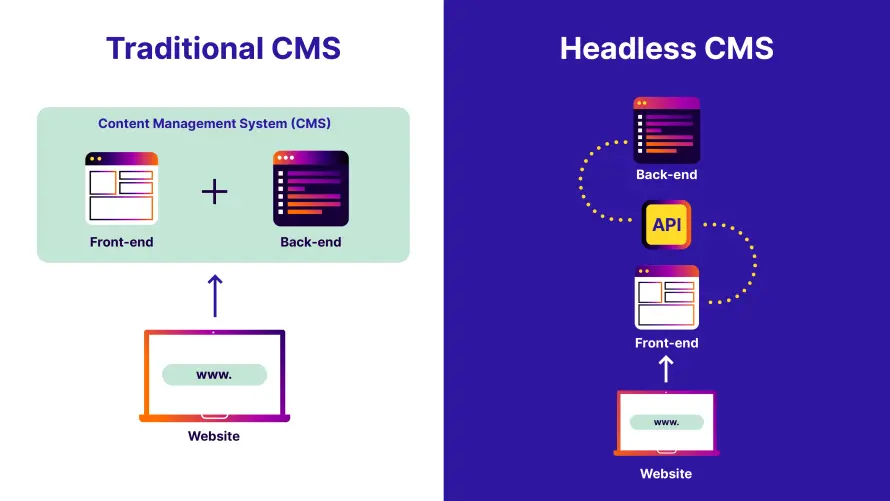
Traditional managed WordPress hosting is designed for a monolithic model where WordPress handles everything. The same system stores content, renders templates, executes PHP and serves HTML pages to visitors. Hosting platforms in this category focus heavily on PHP performance, page-level caching and theme/plugin compatibility because every user request flows through WordPress itself.
Headless WordPress flips that model. This means performance is no longer about how fast WordPress can generate a page, but how quickly and reliably it can serve content through REST or GraphQL endpoints. Caching strategies shift away from full-page caching toward object caching, API response caching and edge delivery on the frontend.
It also changes operational workflows. In a traditional setup, updates happen inside WordPress and are immediately live. In a headless setup, content changes may trigger frontend rebuilds, cache invalidation or revalidation logic.
Hosting, therefore, needs to support staging environments, predictable API performance during builds and secure preview workflows for editors.
What to look for when choosing a host for a headless WordPress site
A headless WordPress host needs an API-ready backend, isolated infrastructure, secure preview workflows and a frontend deployment path. Because headless WordPress separates responsibilities, you should effectively choose hosting that’s able to handle a system made up of multiple parts:
- The WordPress backend must be optimized for API-heavy workloads, with modern PHP support, strong database performance and object caching to handle frequent content queries. Since every frontend request depends on the API, even small inefficiencies in the backend can become visible at scale.
- Container-based or otherwise isolated architectures are far better suited to headless use cases than generic shared hosting, especially when traffic spikes or build processes increase API demand.
- The host should provide strong security controls, reliable backups and staging environments, because WordPress remains mission-critical even though it’s no longer public-facing.
- Your frontend will live on infrastructure designed for modern JavaScript applications, often with a global content delivery network (CDN) and automated deployments. The best headless WordPress hosts recognize this reality and either integrate cleanly with frontend platforms or provide tooling that supports API performance, preview workflows and scalable content delivery end to end.
When headless WordPress is implemented correctly, most teams can see faster page load times compared to traditional WordPress, driven by static rendering, CDN delivery and reduced server-side processing. Time to first byte (TTFB) often drops from over a second to just a few hundred milliseconds, making pages feel instantly responsive.
Also, because the front end is fully decoupled, developers can optimize Core Web Vitals – improving metrics like Largest Contentful Paint (LCP) and First Contentful Paint (FCP) with modern rendering and image strategies. These gains aren’t automatic, but when the architecture is done right, the speed benefits are substantial.
If you’re building a headless WordPress site with Next.js, Pantheon’s approach can be attractive for teams that want fewer moving parts. Pantheon offers a Next.js runtime on Google Cloud Run, available on Gold plans and above. This allows developers to host both the WordPress backend and the Next.js front end within the same platform, using GitHub-based CI/CD, built-in CDN caching and other essential capabilities. For Next.js projects that rely heavily on server-side rendering, previews and tight collaboration between developers and editors, this unified model removes a lot of operational friction.
Are there any affordable or free options for headless WordPress hosting?
Yes, there are affordable or free options for headless WordPress hosting, but it’s important to match expectations with reality. Low-cost options are excellent for learning, prototyping and early-stage projects, but they usually come with limitations around production, performance, support or scalability. Meanwhile, “free” offerings are almost always not free production hosting – they are limited trial or development tiers designed to let you explore a platform’s tooling rather than run a live, publicly accessible site.
For true zero-cost experimentation, development environments are the safest place to start. Pantheon’s free development tier, for example, lets developers experiment without going live or paying for production infrastructure. Similarly, WordPress.com’s free tier can be useful for learning how the REST API works, even though it’s not suitable for serious headless production use.
At the budget end of the spectrum, shared WordPress hosts in the $2–$5 per month range can support basic headless builds using the REST API. When combined with a free frontend tier from a service like Netlify, it’s possible to run a functional headless setup for the cost of a domain name. This might work well for small sites, but it comes with trade-offs like limited support, shared resources, security risks and fewer guarantees under traffic spikes.
So, while free and low-cost options are useful for learning and early experimentation, they often fall short once performance, reliability, security and team workflows become critical. That’s where purpose-built platforms come in – let’s look at the leading headless WordPress hosting providers and how they compare.
Top headless WordPress hosting providers
Pantheon
Pantheon is a strong headless WordPress choice for teams that need a managed backend, a Next.js runtime and Git-driven Dev, Test, Live workflows on one platform. It runs WordPress on load-balanced containers and supports server-rendered Next.js frontends on Google Cloud Run.
Here’s how:
- At the infrastructure level, Pantheon runs WordPress on an isolated, container-based architecture designed to scale automatically. This means your WordPress backend can handle sudden spikes in API traffic – such as frontend rebuilds, preview requests or global content delivery – without manual intervention. Combined with Pantheon’s global CDN, API responses are cached and served from dozens of edge locations worldwide, keeping latency low for frontend applications no matter where users are located.
- For performance, Pantheon offers modern PHP support, Redis object caching and optimized database handling. WordPress API requests remain fast and predictable. This is critical in headless setups, where every page render, preview or client-side interaction depends on backend API speed.
- Pantheon caters to developer experiences with a built-in Dev, Test, Live workflow, along with Multidev environments, allowing teams to develop features, test API changes and preview frontend integrations safely in parallel. Also, Git-based workflows, combined with the Terminus CLI, make it easy to automate deployments, manage plugins, clear caches and integrate WordPress into modern CI/CD pipelines.
Additionally, Pantheon is actively expanding its headless offerings with Next.js, which runs server-rendered frontends on the same enterprise-grade infrastructure. This direction reflects Pantheon’s long-term investment in headless and modern frontend workflows, while continuing to deliver best-in-class WordPress backend hosting today.
WP Engine
WP Engine’s headless platform (formerly Atlas) bundles Node.js hosting with WordPress on its managed tiers. It combines managed WordPress hosting with production-ready Node.js infrastructure, global CDN delivery and Git-based deployments, so developers don’t have to stitch together multiple vendors or manage DevOps complexity.
Another aspect is Faust.js, an open-source framework built on Next.js that bridges the gap between WordPress and modern frontend development. Faust.js preserves familiar WordPress concepts like template hierarchy while enabling modern rendering patterns such as static generation and server-side rendering. It also solves one of the hardest headless challenges: authenticated previews, allowing editors to preview content before publishing.
Kinsta
Kinsta is a managed WordPress host. For headless builds, teams run the WordPress backend on Kinsta and serve the frontend separately – using Kinsta's own Static Site Hosting (pre-rendered builds) or Application Hosting (Node.js apps), or a third-party frontend host. Backends run in isolated containers with caching and Cloudflare security.
This modular approach gives teams flexibility in how they assemble and run their stack, which suits hands-on teams that want that control – but it means more setup and ongoing maintenance than an integrated, all-in-one workflow.
Reviewers also flag practical trade-offs: pricing sits at the premium end with no low-cost entry tier, and plans carry visit and resource caps that can feel restrictive for fast-growing or spiky sites, with larger scaling sometimes requiring a conversation with sales.
Contentstack
Contentstack sits in a different category altogether. It’s a pure headless CMS designed for enterprise omnichannel content delivery, not a WordPress hosting platform. Built on an API-first, cloud-native architecture, Contentstack is designed to distribute content across websites, mobile apps and emerging digital channels from a single source of truth.
The platform excels in advanced content modeling, workflow management and personalization, offering visual editing tools, scheduling timelines and deep integration with analytics and customer data platforms. Contentstack also provides optional frontend hosting optimized for modern JavaScript frameworks.
For organizations evaluating headless WordPress, Contentstack is best viewed as an alternative CMS rather than a hosting option. It’s ideal for large enterprises looking to move beyond WordPress entirely in favor of a fully composable, enterprise-grade content platform.
Upsun
Upsun is a DevOps-centric platform-as-a-service designed for teams that want full control over their infrastructure through Git-based, infrastructure-as-code workflows. It supports WordPress, Next.js and other frameworks as first-class applications that can live side by side within the same project.
For headless WordPress, Upsun allows teams to define a WordPress backend and one or more front-end applications using declarative configuration files. Every Git branch can automatically spin up a complete, isolated environment with databases, caches and services provisioned consistently across development, staging and production.
Upsun may only be an attractive choice for technically mature teams that value reproducibility, multi-cloud flexibility and advanced architecture patterns.
What are the benefits of a headless CMS?
A headless CMS lets teams reuse content across channels, update frontends independently and govern publishing with clear roles and audit trails. It changes how teams work, scale and evolve over time with:
- Operational efficiency and productivity: Content teams publish and update independently of development cycles, reducing bottlenecks. Structured content models eliminate duplication and rework across regions, brands and platforms. Parallel workflows allow marketing, design and engineering to move at the same time.
- True omnichannel readiness: A single content source can power websites, mobile apps, kiosks, partner portals and future channels. Consistent messaging is maintained across touchpoints without rebuilding content per channel. New channels can be added without rethinking your CMS or content structure.
- Reduced long-term technical debt: Frontends can be redesigned or rebuilt without touching content or editorial workflows. Backend and frontend upgrades happen independently, lowering risk during change. Fewer platform constraints mean less reliance on brittle, CMS-specific workarounds.
- Stronger governance and compliance: Role-based permissions control who can create, edit, approve or publish content. Version history and audit trails support compliance and internal review processes. Approval workflows scale cleanly across large teams and regulated environments.
- Future-proof digital strategy: API-driven content integrates easily with personalization, analytics and AI systems. Composable architecture reduces vendor lock-in and supports best-of-breed tools. Organizations can adapt faster as customer expectations and technologies evolve.
Host your headless site with Pantheon
Headless WordPress is a long-term investment in flexibility, scalability and team velocity. The hosting you choose determines how well that investment pays off. As content volumes grow and experiences expand across channels, you need infrastructure that’s built for change, not workarounds.
Pantheon delivers exactly that. With a production-ready WordPress foundation, global CDN, container-based architecture and Git-driven workflows, Pantheon makes it easier to run WordPress as a reliable headless CMS at scale. Features like Multidev environments, enterprise security and expert support help teams move faster without compromising stability.
If you’re ready to build serious headless WordPress experiences, start with Pantheon today to ship, scale and evolve with confidence!