
Replatforming vs. Refactoring vs. Rehosting: How to Decide
Replatforming, refactoring and rehosting can all move a website forward, but they solve different problems. For a WordPress or Drupal site, the key question is where the constraint actually lives.
Choosing the right approach depends on the changes the site actually needs. That’s why this guide breaks down replatforming, refactoring and rehosting. It’ll also explain when each approach makes sense and when combining them in stages is the smarter path.
What is the difference between replatforming, refactoring and rehosting?
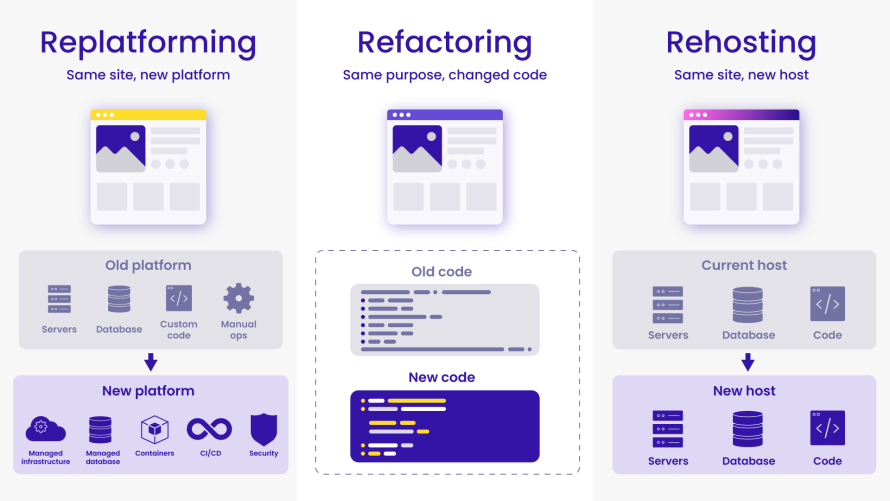
Replatforming changes the platform around an application, refactoring changes the application itself and rehosting moves it to new infrastructure with as little change as possible. The difference is primarily which layer of the technology stack you are trying to improve.
Here’s a breakdown:
- Replatforming, sometimes described as “lift, tinker and shift,” moves the application to a new platform and makes the adjustments needed to operate there and use selected platform capabilities, without fundamentally rebuilding the application. For a WordPress or Drupal website, replatforming can mean keeping the CMS, content, data model and much of the existing application code while changing the infrastructure and operational layer around them. Deployment workflows, development environments, caching, monitoring, scaling and maintenance processes can all change.
- Refactoring changes the application itself by modifying existing code to improve areas such as structure, performance and maintainability while maintaining the application's functionality. For a CMS website, that could mean restructuring custom theme or module code, improving inefficient application logic or replacing brittle integrations.
- Rehosting, often called “lift and shift,” moves an application to new infrastructure while changing as little as possible. For a WordPress or Drupal site, that generally means moving the existing site and its stack to a different hosting environment without intentionally changing how the application works.
Image
At a glance:
| Strategy | What primarily changes | The question it answers |
Rehost | Infrastructure | Can we move the existing site with minimal change? |
Replatform | Platform and operating model | Can we improve how the site runs without rebuilding it? |
Refactor | Application code | Does the code itself need to change? |
The right strategy starts with diagnosing where the actual constraint lives, not simply choosing the most ambitious modernization option.
When should you rehost, replatform or refactor?
You should replatform, refactor or rehost based on which layer of the website is preventing you from reaching your goals. The aim is to make enough change to solve the actual problem without creating unnecessary scope.
Choose replatforming when the platform is the constraint
Replatforming makes sense when the WordPress or Drupal site itself is still viable, but the environment around it no longer meets your needs. It’s particularly useful for teams who want to reduce operational overhead or improve reliability with minimal code changes.
For example, you may be dealing with difficult deployment processes, inconsistent development environments, too much infrastructure maintenance or hosting that no longer provides the operational capabilities the organization requires. In that case, replatforming to Pantheon, for instance, lets you retain much of the existing site while changing how it is operated, introducing better deployment workflows, caching, monitoring, scaling and infrastructure management without requiring a complete rebuild.
Choose refactoring when the code is the constraint
Refactoring is appropriate when the problems live inside the application itself. That could mean difficult-to-maintain custom code, application logic that limits performance, accumulated technical debt that slows development or an implementation that makes necessary changes increasingly risky.
Refactoring tackles those problems directly by changing the code. That also means greater engineering involvement and testing because you are modifying application behavior rather than primarily changing its environment.
If the problem goes deeper than individual parts of the codebase and the fundamental architecture no longer supports the site's requirements, the project may move beyond refactoring into rearchitecting or rebuilding (more on rebuilding below).
Choose rehosting when the priority is simply to move
Rehosting makes sense when the existing application and operating model don’t need changing, but the immediate requirement is to move them elsewhere with minimal change.
For example, an organization may need to leave an existing hosting environment because of a contract change, infrastructure retirement or a fixed migration deadline. If there is no immediate need to change the site's code, architecture or development workflow, rehosting can keep the project focused on getting the existing application running in the new environment.
Real projects do not always fit neatly into one category. If both the platform and the code need attention, the better question becomes whether to change them at the same time or in stages.
Should you replatform first and refactor later?
Replatforming first and refactoring later can make sense when both the platform and the application need improvement, but they do not need to change at the same time.
Separating the two projects reduces the number of variables being changed at once. A team can first move the site onto the new platform, validate that its content, functionality and integrations still work as expected, then determine which remaining problems actually come from the application code.
For a WordPress or Drupal site, that can translate into a practical sequence:
- Replatform the existing site and make the changes required for the destination platform.
- Test and stabilize it in the new environment.
- Measure what remains, such as slow application logic, fragile integrations or difficult-to-maintain custom code.
- Refactor selectively where the evidence shows that code changes will solve a real problem.
This is not always the right order. If the existing application cannot run appropriately on the target platform or its architecture is already the main constraint, code or architectural changes may need to be part of the migration itself.
The point is to avoid postponing necessary modernization while also avoiding combining two major scopes when separating them creates a more manageable path.
Is replatforming the same as redesigning or rebuilding a website?
No, replatforming changes the platform a website runs on, redesigning changes the user experience, while rebuilding replaces substantial parts of the website itself.
In more detail:
- Redesigning primarily changes what visitors see and how they interact with the site, including visual design, UX and information architecture. The CMS and hosting platform can remain unchanged.
- Rebuilding replaces substantial parts of the site's implementation, which might include new templates, a new theme, rewritten functionality, a different architecture or even a different CMS.
These scopes can overlap without being dependent on one another. An organization can replatform an existing WordPress site while preserving its design and functionality. It can also redesign the entire site without changing platforms. A larger modernization project might combine replatforming with a redesign or rebuild.
Keeping those scopes separate makes planning easier. If the website itself still meets business and user needs, a problem with the underlying platform does not automatically justify redesigning or rebuilding the site too.
Mapping the decision to your next step
Once you know where the constraint lives, the next step is to scope the smallest project that resolves it. Rehost when the site mainly needs to move, replatform when the operating platform needs to change, and refactor when the application code itself needs work. If both the platform and code are problems, consider whether replatforming first would give you a more stable foundation for targeted modernization afterward.
Pantheon is a strong replatforming choice for WordPress, Drupal and Next.js teams that want to keep their website while replacing the infrastructure and WebOps model around it. Instead of treating the move as a change of hosting address, Pantheon reduces infrastructure management and gives teams standardized workflows for developing, testing and deploying sites.
With Pantheon, teams get:
- A Dev, Test, Live workflow: Every site has separate permanent environments for developing, testing and deploying code through a version-controlled workflow.
- Multidev environments: Teams can create parallel development environments so multiple features, fixes or migration workstreams can be built and tested independently.
- GitHub integration: Pantheon can connect directly to an external GitHub repository, automatically deploying pull requests to Multidev environments and changes to the primary branch to Dev. This lets teams keep GitHub as their code repository while using Pantheon's environments for testing and deployment.
- Autopilot: Eligible sites can automate WordPress and Drupal updates in an isolated environment, run visual regression testing (VRT) and deploy successful updates according to the configured workflow.
- Container-based architecture: Pantheon runs application and supporting services in a container-based infrastructure designed to separate workloads and support scaling without teams managing individual servers.
- Global CDN: Pantheon includes globally distributed page and asset caching, reducing requests that have to reach the CMS origin and helping sites handle traffic more efficiently.
- Upstreams: Organizations managing portfolios of related sites can standardize shared code and configuration rather than maintaining each site independently.
Teams can also choose how much migration work to take on themselves. Pantheon provides self-guided migration tooling and documentation for WordPress and Drupal, while its Managed Migration Service can transfer site code, databases and files, address supported compatibility issues and assist through testing and launch.
Take SUNY Fredonia, for instance. They migrated their Drupal website portfolio to Pantheon after spending significant time managing backend infrastructure. After the move, SUNY Fredonia cut new site creation from at least a day to about 10 minutes, while Autopilot cut the time required for site updates by half. Multidev and Upstreams also saved the university dozens of development hours.
Before Pantheon, it would have taken a day to copy over a testing environment to work in, and even then, we couldn’t be sure how well the project would work in production. Pantheon enables us to create, test and deploy new services at lightning speed.”
– Andrea Wasiura, Project Management Professional, Web Development Manager at SUNY Fredonia
That is ultimately what the replatforming decision should achieve – keep what is working in the application while replacing the platform constraints that are slowing the organization down.
If the platform underneath your WordPress or Drupal site is holding you back, replatform on Pantheon today and give your site a stronger foundation and room to move faster.