
WordPress Development Environments from Local to Cloud
A WordPress development environment is an isolated workspace where developers can build, modify and test a WordPress site without affecting the version serving real users. It may run on a developer’s computer, in containers or on remote cloud infrastructure.
For teams managing multiple or business-critical WordPress sites, the bigger question is how to build a development workflow that stays reproducible across machines, gives developers room to work independently and provides a controlled path from unfinished code to the live site.
That’s why this guide explains how WordPress development environments fit together from local to cloud, how the major approaches differ and how to choose a setup that can scale with your team.
How local, staging and production environments work together
A WordPress development workflow can use several environments, but each one should have a distinct purpose. The key difference is how close the environment needs to be to production and who needs access to it. WordPress itself recognizes local, development, staging and production as distinct environment types through WP_ENVIRONMENT_TYPE:
- Local development runs on a developer’s machine. It is typically the fastest place to write code, debug changes, experiment and work offline without affecting teammates or users.
- Cloud development moves that work to remote infrastructure. Branch or feature environments can give teammates, QA and stakeholders access to work in progress while reducing differences caused by individual laptop configurations.
- Staging is where a release candidate is validated before launch. The more a change depends on infrastructure such as caching, HTTPS, integrations or production-like data, the more important staging parity becomes.
- Production is the live environment serving real users and data. Changes here carry the highest risk, so development and validation should happen earlier in the workflow.
This distinction also affects how data should move. Code is normally promoted toward production through version control and controlled deployments, while production content may need to be copied back into non-production environments so testing happens against realistic, current data. Blindly replacing production with an older local database can overwrite newer content.
Pantheon, for instance, formalizes this model with separate Dev, Test, Live environments. Its workflow deploys code from Dev into Test, where teams can combine it with the current database and files cloned from Live before promoting the tested code to production.
Image
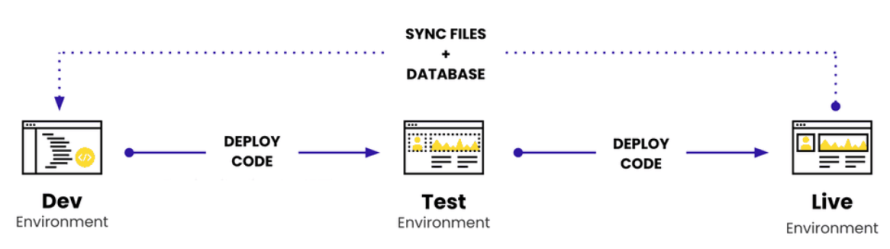
The result is an important separation of concerns – development environments are for building, staging is for proving a release, and production is for serving it.
Choosing a local WordPress development environment
There is no single best local WordPress environment. The right choice depends on whether you prioritize fast setup, production similarity or a reproducible configuration that every developer on the team can run.
GUI-first tools
Local and WordPress Studio remove much of the manual server configuration behind local WordPress development:
- Local bundles WordPress-oriented features such as selectable PHP and web server environments, reusable Blueprints, Xdebug, email interception, and Live Links for sharing a locally running site. It also has direct push/pull integrations with WP Engine and Flywheel.
- WordPress Studio is an open-source local development app that supports HTTPS and custom domains, WP-CLI through Studio CLI and Xdebug. Studio uses SQLite by default rather than requiring a local MySQL server, although custom MySQL setups are supported.
These tools are a strong fit when developers want to get productive quickly without maintaining the underlying stack themselves.
Configuration-driven environments
For teams that care more about reproducibility across developers and projects, container-based tooling is often a better fit.
WordPress's wp-env, for example, lets a project define its WordPress version, PHP version, plugins, themes and other settings in .wp-env.json, making it particularly useful for plugin, theme and block development.
DDEV and Lando provide broader containerized development workflows.
Traditional local server stacks
Tools such as MAMP and XAMPP remain perfectly valid when developers want a conventional PHP, web server and database stack with more direct control. MAMP, for example, provides Apache or Nginx, PHP and MySQL locally.
The trade-off is that these tools provide less WordPress-specific workflow automation out of the box. For a solo developer, that may not matter. For a team, the bigger question is whether everyone can reliably recreate the same environment.
When cloud development environments make more sense than local
Local development is usually the fastest place to write and debug WordPress code, but keeping every development environment on individual laptops becomes less practical as collaboration, infrastructure dependencies and parallel work increase.
A cloud development environment is particularly useful when:
- Several people need access to the same work: Developers, QA teams, designers and stakeholders can review a remotely accessible environment without recreating the project on their own machines.
- Environment consistency matters across a team: Moving development onto standardized infrastructure reduces differences and configuration drift caused by operating systems, PHP versions, local configuration or container setups – the kinds of differences that can lead to “works on my machine” failures.
- The feature depends on external systems: OAuth callbacks, webhooks, third-party APIs, HTTPS, scheduled tasks and other network-dependent behavior are often easier to validate from a stable, publicly reachable environment than from localhost.
- Teams are developing several features concurrently: Branch-specific cloud environments allow developers to isolate work instead of continuously merging unfinished changes into one shared development site.
- Local resources become a constraint: Running several containerized WordPress projects, large databases, or supporting services at once can consume significant CPU, memory and storage on developer machines.
Cloud development does not make local development obsolete. The two solve different problems. Local environments optimize the individual coding loop while cloud environments become more valuable when the work needs to be shared, standardized, integrated or tested beyond one machine.
Moving safely from local development to the cloud
Moving a WordPress project from local development to the cloud should not mean repeatedly copying an entire site from one environment to the next. Code, content, uploaded files and environment-specific configuration change at different rates, so mature workflows move each deliberately.
A reliable local-to-cloud workflow usually follows these principles:
- Moving code through version control: Custom themes, plugins and other deployable code should be committed to Git so changes can be reviewed, traced and promoted through shared environments rather than copied manually between machines.
- Automating repeatable checks before deployment: Git pushes and pull requests can trigger continuous integration (CI) workflows that run linting, unit tests, integration tests, builds and other project-specific checks before code reaches a shared environment. This catches deterministic failures earlier and gives every developer the same baseline checks regardless of where the code was written. Changes that depend on production-like infrastructure, real integrations, caching or representative content still need to be tested in an appropriate environment before release.
- Treating content separately from code: The production database may keep changing while development is underway. Replacing it with an older local database can overwrite new posts, users, orders, form submissions or configuration. Instead, teams commonly refresh non-production environments with production content when realistic data is needed.
- Handling URL changes with WordPress-aware tooling: Moving a database between domains often requires replacing stored URLs. A simple SQL or text replacement can damage serialized PHP data. WP-CLI's wp search-replace understands serialized data and provides a --dry-run option so changes can be inspected before they are written.
- Keeping environment-specific settings outside shared code: Database credentials, API keys and other secrets should be supplied per environment rather than hard-coded into files committed to Git. Pantheon, for example, has separate local configuration and secrets workflows for this purpose.
- Use the cloud for tests that depend on the cloud: A laptop can validate application logic, but integrations, HTTPS behavior, caching, cron jobs, outbound email, and production-like infrastructure may require a remotely accessible environment.
That last point is the reason local development does not eliminate staging. Local environments optimize the build-and-debug loop while cloud environments let teams verify that the same code behaves correctly when it becomes part of the wider application.
Building a repeatable local-to-cloud workflow with Pantheon
Pantheon is a WebOps and hosting platform that supports the full WordPress development workflow from local development through cloud-based development, testing and production. It combines hosting infrastructure with development environments and a Git-based workflow for moving changes from development to production. Also, developers can work locally with supported workflows such as Lando, then synchronize that work with Pantheon’s Dev, Test, Live and Multidev environments.
Once code leaves a developer’s machine, Pantheon provides the controlled environments around it:
- Dev, Test, Live are separate environments: Code moves from Dev to Test to Live, while production database content and uploaded files can be cloned down for testing. This lets teams validate new code against current content without overwriting Live with an older development database.
- Multidev adds parallel cloud development: A Multidev can fork the site's code and content into an independent branch environment with its own database and files. That allows developers to work on separate features simultaneously and merge the code back when it is ready.
- Only tested code moves to Live: Test and Live are downstream deployment environments, so code normally progresses through the Git-based pipeline rather than being edited directly in production.
The advantage is that Pantheon gives each environment a defined job. Developers can keep the fast feedback loop of local development, use isolated cloud environments when collaboration or integration testing is needed, validate the combined release in Test and promote the same tested code to Live.
That turns the path from local WordPress development to production into a repeatable team workflow rather than a series of manual migrations.
Choosing the right environment setup for your team
The best WordPress development environment is not necessarily the tool with the longest feature list. It is the setup that gives developers a fast place to build while giving the wider team a reliable way to review, test and deploy changes.
Local environments remain valuable for day-to-day coding and debugging. Cloud environments become increasingly important when multiple developers, external integrations, realistic infrastructure and controlled releases enter the picture.
Pantheon connects those stages with a structured Dev, Test, Live workflow, plus Multidev for parallel cloud development on eligible plans. Teams can keep using the local tools that suit them while moving shared testing and deployment into standardized cloud environments.
Start with Pantheon today and build a WordPress development environment that scales with your team, from local development to production!