
Enterprise Drupal Multi-Environment Strategy and Hosting Architecture
Image
Enterprise Drupal today is about building systems that can grow, adapt and stay reliable no matter how fast your organization moves. As digital teams expand and demands increase, Drupal’s real value shows up in how you structure it – the environments you use, the workflows you follow, the way you manage configuration, deploy changes, integrate systems and protect performance.
When these pieces work together, Drupal becomes a powerful enterprise engine capable of supporting complex content models, global publishing workflows, decoupled frontends, multilingual experiences and deep integrations with business systems. When they don’t, teams feel the pain quickly: outages, broken deployments, inconsistent environments and slow release cycles.
This guide breaks down what a truly modern enterprise Drupal setup looks like and how the right platform, like Pantheon, can transform the speed, safety and success of your digital operations.
What does an enterprise Drupal setup look like?
An enterprise Drupal setup is defined less by any single technology choice and more by how the pieces work together. Most organizations anchor on the latest Drupal 11 for its speed, modern PHP 8.3 foundation and composable, API-first approach. Around it sits a disciplined delivery pipeline that implements a Dev, Test, Live workflow, incorporates Composer and Git for managing code and deployments and leverages a managed hosting solution like Pantheon for optimum performance.
Let’s unpack this.
Dev, Test, Live workflow
Every serious Drupal organization should treat a Dev, Test, Live (or Dev, Stage, Prod) workflow as non-negotiable. Drupal’s architecture, security model and modern continuous integration and continuous deployment (CI/CD) expectations all assume that code moves through multiple gated environments before going live. Trying to operate without this pattern puts teams out of alignment with the Drupal community, major hosting platforms and even basic security standards.
Drupal’s YAML-based config system assumes you’re exporting configuration in Dev, committing it to Git and importing it in Test and Live. That workflow simply doesn’t work without multiple environments. Installing modules, testing features or enabling development tools on a live site introduces unacceptable risk, from downtime and configuration drift to catastrophic data loss.
Not to mention, development modules like Devel and UI-heavy tooling are strongly discouraged from appearing in production and the only safe way to enforce that separation is through distinct, isolated environments.
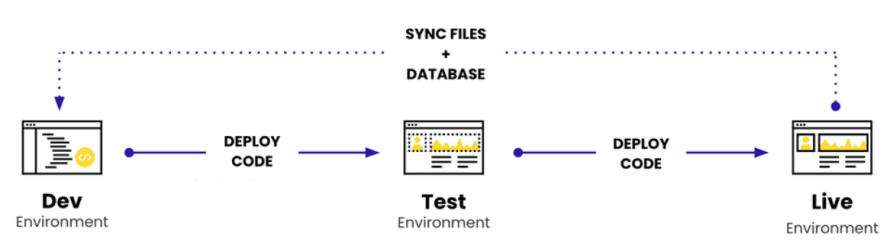
Most enterprise teams follow a familiar pattern: Local → Dev → Test/Stage → Live/Production for standard setups.
Leading hosting platforms build this model into their DNA. Pantheon, for example, builds this model directly into its platform. Every site includes dedicated Dev, Test, Live environments, each isolated in its own containerized stack. Code always moves upward (Dev → Test → Live), while content moves downward so developers test against real data.
Image
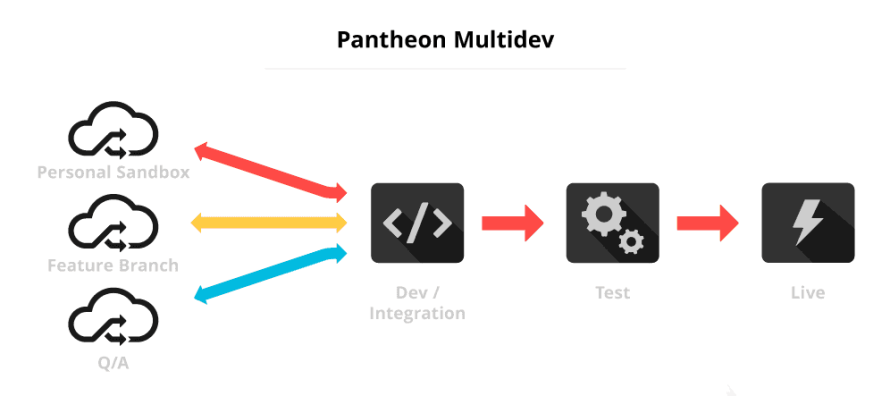
For parallel feature work, Pantheon Multidev creates full, on-demand cloud environments tied to branches or pull requests, enabling teams to work independently without blocking one another.
Image
Local development fits smoothly into this architecture. Tools like DDEV and Lando integrate directly with Pantheon, allowing developers to spin up matching PHP/Nginx/MySQL environments in seconds. With a single pull command, you can mirror any Pantheon environment locally, complete with the latest database and files. This keeps local work aligned with what’s actually running in the cloud and prevents configuration drift. From there, code is committed to Git, pushed to Pantheon’s Dev environment and deployed upward through the standard pipeline.
The result is a disciplined, reliable workflow where production remains clean and stable, developers stay fast and autonomous and every change moves through a predictable, testable path.
Using tools such as Composer and Git for managing code and deployment workflows
Git provides the single source of truth for your application code and configuration. Every change is tracked, reviewed and tied to a branch or pull request. Feature branches, code review and protected main branches keep risky changes out of production, while CI/CD systems hook into Git to run tests and deployments automatically.
On Pantheon, every site is backed by a Git repository, so pushing to Dev, promoting to Test and deploying to Live are just controlled Git operations, not ad-hoc server edits.
Composer does the same job for dependencies. Drupal core, contrib modules, themes and PHP libraries are all declared in composer.json and locked in composer.lock, ensuring every environment installs the exact same versions. This gives you reproducible builds, fast security updates and no “works on my machine” surprises.
Pantheon’s Integrated Composer and Build Tools take this further by running Composer during builds, committing lock file changes and wiring everything into Multidev and CI workflows. The result is a clean, code-first pipeline where Git, Composer and Drupal’s Configuration Management work together to deliver reliable, testable deployments on every release.
Managed hosting solution – such as Pantheon – for improved workflows, security and performance
As digital operations grow more complex and as downtime and security risks carry higher financial impact, WebOps platforms like Pantheon provide specialized infrastructure that self-hosted environments simply can’t match.
Beyond its Dev, Test, Live workflow and Multidev feature, Pantheon removes the operational burden of maintaining servers, applying OS patches, updating PHP and databases and troubleshooting outages. Instead, teams get a fully managed, container-based platform that scales automatically, isolates workloads and delivers consistently fast response times.
Security is equally turnkey. Pantheon provides managed HTTPS, DDoS mitigation, a WAF, immutable code environments and SOC 2 Type II compliance. Organizations also get automated updates via Autopilot and daily backups, further hardening the environment.
Performance comes from Pantheon’s global content delivery network (CDN) with edge caching, Redis object caching and advanced page caching. High-availability options like Multizone Failover deliver 99.99% uptime with real-time replication.
As you can see, for enterprises, Pantheon shifts resources away from server maintenance toward innovation – delivering faster releases, stronger security, predictable costs and performance architecture purpose-built for Drupal at scale.
Is Drupal a good option for enterprise sites?
Let’s explore exactly why Drupal remains one of the strongest CMS choices:
- Scalability across all project sizes: Drupal’s advanced capabilities and customization make it an excellent choice for enterprise organizations. And thanks to the Drupal CMS/Starshot initiative, Drupal is now equally approachable for mid-size and smaller teams. From simple marketing sites to global multi-brand ecosystems like Tesla and Pfizer, Drupal can handle it all.
- Structured content and governance strengths: Enterprises choose Drupal for its native Entity API, fieldable content types, revision history and granular permissions. Using contributed modules, field-level access, taxonomy-based controls and ABAC make Drupal far more governance-ready than other post-type-based CMSs like WordPress. Also, core workflows, custom moderation states and Workspaces provide built-in editorial governance without plugin overhead.
- Multilingual capabilities: Drupal is multilingual by design, which is critical for governments, universities and global enterprises. With per-field and per-entity translation, 100+ languages for admin/UI strings and more, Drupal’s multilingual system is enterprise-grade and fully built into the core.
- Integration ecosystem and API-first architecture: With 50k+ contributed modules and a mature plugin architecture, Drupal integrates deeply with virtually any enterprise system. Also, Drupal’s API-first foundation (JSON:API in core, REST, GraphQL module) makes it ideal for omnichannel and decoupled architectures.
- Total cost of ownership (TCO): Drupal has low long-term TCO for complex sites due to cleaner architecture, fewer plugin conflicts and predictable upgrade paths.
Core configuration and deployment workflows
Enterprise Drupal workflows follow a strict code-driven model: everything that defines how the site behaves – content types, fields, Views, permissions, workflows, even infrastructure definitions – lives in Git. The database is treated purely as a content store, never a source of configuration truth. With Drupal 11, configuration management initiative (CMI) and modern CI/CD tooling, this approach guarantees consistency and stability across every environment.
Core configuration management workflow
As we explained earlier, in enterprise Drupal, you never make configuration changes on the live site. Instead, everything begins in your local development environment (usually DDEV or Lando). A developer creates or edits things like content types, fields or Views on their own machine, where it’s safe to experiment.
When they’re ready, they save these changes by running:
drush config:export
This command takes the settings stored in Drupal’s database and writes them into clean, readable YAML files inside /config/sync. These files now become the “official” version of the site’s configuration.
Drupal sites often need slightly different settings in different environments (for example, enabling the Devel module locally, but enabling caching only on production). The Config Split module handles this automatically, so developers don’t have to remember what to turn on or off in each environment.
Drupal Recipes (experimental) make it even easier to ship reusable features. A Recipe is like a pre-packaged bundle of configuration – such as an “SEO Starter Kit” or “Event Registration” – that you apply to a site. They replace older, more rigid systems and make feature reuse far easier.
Once the configuration is exported, developers commit both the /config folder and the composer.lock file into Git. The database itself is never committed, because it constantly changes. Instead, teams regularly pull the production database down to their local environment so they’re building and testing with real content.
A file synchronization strategy fits into this workflow as well. Files (like images and documents) cannot be version-controlled, so developers regularly pull down production files to their local environment to test with realistic assets. The rule is simple: code goes up, content and files go down.
Automated deployment pipeline (CI/CD)
When developers push changes to Git, an automated CI/CD pipeline takes over. This pipeline installs PHP dependencies (via Composer), compiles frontend assets, runs tests and packages everything into a clean, ready-to-deploy build. If tests fail, the deployment stops, preventing broken code from ever reaching production.
On deployment, modern Drupal teams use:
drush deploy
This single command safely runs database updates, imports the configuration you exported earlier and clears caches so the site uses the new settings:
- Database update handling: drush updb applies any database schema changes introduced by new code or modules.
- Configuration import: drush config:import loads the YAML configuration exported earlier, ensuring the site’s active configuration matches what’s in Git.
- Cache clearing procedures: drush cache:rebuild ensures Drupal immediately uses the new code and configuration, preventing stale data from causing errors.
If anything goes wrong, the deployment stops immediately instead of leaving the site in a half-updated state. However, this is not a true atomic transaction – enterprise teams typically take database snapshots before deployment to enable manual rollback if needed.
For a Zero-downtime deployment strategy, enterprise pipelines use Blue/Green or Rolling Deployments, which means new containers are started in the background, tested and warmed up before traffic is switched over. This avoids the brief “white screen” or slowdowns that can happen during cache rebuilding or database updates.
Infrastructure and orchestration
Self-hosted enterprise Drupal often runs on Kubernetes and Helm charts describe how many containers to run, how they scale and what resources they need. GitOps tools like ArgoCD watch for changes in Git and automatically apply updates to the cluster, keeping infrastructure and code in sync.
For organizations that don’t want to deal with the infrastructure and orchestration themselves, Pantheon abstracts them entirely. Instead of managing Kubernetes directly, you place settings in a simple pantheon.yml file and Pantheon handles the underlying infrastructure.
Deployment logic is also simplified with Pantheon – configuration imports run through Quicksilver hooks. Also, Upstreams provide a centralized codebase scaffold for creating multiple sites with common functionality.
Ensure enterprise success with Pantheon
Enterprise Drupal success depends on consistent configuration management, code-driven workflows, predictable deployments and infrastructure built to scale. Pantheon brings all of this together with Dev, Test, Live environments, Multidev for parallel work, integrated Composer and Quicksilver automation. And, instead of managing servers or Kubernetes, your teams focus entirely on building features, improving content velocity and delivering secure, high-performance digital experiences.
If you want a Drupal platform that accelerates releases, strengthens governance, simplifies updates and eliminates the operational burden of enterprise hosting, there’s no better choice. Pantheon is the WebOps foundation modern enterprises rely on – fast, secure, reliable and built for scale.
Move to Pantheon and unlock enterprise-grade performance today!