
Choosing Between Drupal and WordPress for Your University Website
Image

Universities sit at the intersection of scale, complexity and public trust. A modern university website must support thousands of pages, dozens of departments, strict security and accessibility standards and a steady stream of editors with varying technical skill levels. At the same time, it must remain fast, reliable and flexible enough to evolve with institutional needs.
For years, Drupal and WordPress have been the two dominant CMS choices in higher education – each with strong advocates and proven track records across flagship university sites. Yet, choosing between them is rarely a simple feature checklist. The right platform depends on governance models, editorial workflows, integration requirements and long-term maintenance realities.
This guide breaks down Drupal vs. WordPress specifically through a university lens, helping digital teams, IT leaders and communications departments make a confident, future-ready decision.
WordPress vs. Drupal: Which suits your university site?
Choosing between WordPress and Drupal means understanding how each platform aligns with a university’s people, processes and governance model. That’s why factors like ease of use, security, permissions, scalability, maintenance and integrations must be evaluated carefully.
Ease of use
Ease of use in a university context is largely defined by how quickly non-technical staff can become productive while still supporting institutional standards. WordPress and Drupal approach this challenge from different design philosophies.
WordPress prioritizes approachability. Its block-based editor offers a visual, WYSIWYG-style experience that mirrors common word-processing tools. Faculty, administrative staff and student contributors can typically create and update content with minimal training, often becoming self-sufficient within a few hours. This lowers dependency on central IT teams and supports highly decentralized publishing models common in universities.
Drupal, by contrast, is designed for flexibility and control. Its editorial experience has improved significantly – particularly with Layout Builder and recent UI refinements – but it still assumes a higher level of familiarity with content structures, workflows and permissions. Editors benefit from more powerful governance and structured content capabilities, but onboarding usually requires formal training and ongoing support.
However, the release of Drupal CMS represents a strategic shift. Drupal CMS 1.0 introduces pre-configured recipes, a simplified administrative interface, and AI-assisted tools designed to reduce setup complexity. Building on Drupal 11's Layout Builder and modernized UI improvements, Drupal CMS begins narrowing the usability gap. The next major milestone is Drupal CMS 2.0. This will integrate Drupal Canvas, which is a visual page builder that promises to make site building significantly more intuitive for non-technical users through drag-and-drop components and in-browser design tools.
In practice, ease of use depends less on raw interface design and more on how much control an institution needs versus how much autonomy it wants to grant its editors. WordPress optimizes for speed and accessibility, while Drupal – now including Drupal CMS – balances improving usability with enterprise-grade structure.
Security
Security is a non-negotiable requirement for university websites. Institutions must protect student information governed by FERPA, safeguard research data and manage access for thousands of users across faculties, departments and external partners.
Drupal is built with a security-by-design mindset. It includes granular role-based access control in core, predictable security release cycles and a tightly governed extension ecosystem reviewed by a dedicated security team. These characteristics align well with environments that require strict permissions, formal change management and auditable workflows.
WordPress emphasizes rapid updates and broad accessibility. Automatic core security patches are enabled by default and issues are often addressed quickly due to the platform’s large community. However, much of WordPress’s security posture depends on third-party plugins and hosting infrastructure. This makes governance – such as plugin approval, update discipline and monitoring – especially important at scale. This also applies to Drupal in general.
In essence, universities can operate secure sites on either platform. Drupal and WordPress can both achieve strong security outcomes when paired with enterprise-grade hosting like Pantheon, strict extension governance and mature DevOps practices. The deciding factor is more about an institution’s ability to consistently enforce security standards across people, process and technology.
User permissions
Drupal’s native permission architecture allows institutions to create unlimited custom roles with granular control, including permissions at the content type and even field level. This makes it possible to model complex organizational structures. For example, institutions can let faculty update academic profiles while restricting administrative or sensitive fields, without relying on third-party extensions. These capabilities scale well across large multisite or multi-department environments.
WordPress approaches permissions more simply out of the box, using a small set of predefined roles that cover common publishing needs. In higher education, this model is often extended through plugins and WordPress Multisite, enabling universities to give departments control over their own sites while maintaining central oversight at the network level. With the right governance and tooling, WordPress can support role-based access patterns that work effectively for many institutions.
Regarding user permissions, both platforms can be used successfully across higher education.
Scalability
For universities, scalability means more than handling traffic spikes. It also includes scaling governance across hundreds of departmental sites, supporting complex content models (courses, programs, faculty profiles) and maintaining performance through predictable release cycles and operational workflows.
Both Drupal and WordPress can scale to university-grade demands. Drupal’s ecosystem has long been optimized for large, complex institutional estates, which helps explain its strong footprint among top-tier universities. Recent core releases also continue to focus on throughput and efficiency. For example, Drupal 11.3 reports the ability to serve 26–33% more requests with the same database load.
For WordPress, core performance work continues as well. WordPress 6.8 introduced speculative loading, leveraging the browser’s Speculation Rules API to improve perceived speed for navigation-heavy sites.
Both platforms’ scalability is also often driven by hosting, architecture choices, disciplined plugin governance and strong infrastructure (content delivery network (CDN), object caching, autoscaling). Universities usually get the best outcomes by aligning platform strengths to institutional reality: content complexity, number of sites, peak-traffic events (admissions, registrations), and the maturity of the teams and hosting stack supporting the CMS.
Maintenance
Beyond launch, institutions must plan for years of updates, security patches, training and platform evolution – often with constrained budgets and small central IT teams.
WordPress is designed to minimize day-to-day operational overhead. Automatic minor security updates, backward compatibility across major releases and a large ecosystem of managed hosting providers reduce the need for constant developer involvement. In multisite environments, updates and configuration changes can be applied centrally, allowing departments to operate independently while IT maintains a single platform. The broad availability of WordPress expertise also lowers staffing risk and long-term support costs.
Drupal takes a more structured but maintenance-intensive approach. While routine updates are predictable and well-governed, major version transitions can require planned migrations rather than in-place upgrades, which increases reliance on experienced developers or agency partners. In return, institutions gain tighter governance, more controlled change management and long-term architectural consistency.
Integration
Universities often need to integrate with identity providers (SSO), learning management systems (LMSs) and – at larger institutions – research systems. The right CMS is the one that can connect reliably to that ecosystem and stay maintainable over time.
Drupal is frequently selected by research-intensive and top-ranked universities because its architecture is built around structured content and extensible APIs, making it a strong fit for complex, multi-system integrations and centralized governance across many sites.
WordPress remains highly viable for integration as well, especially when requirements are met through well-supported plugins, middleware or enterprise hosting layers.
Enhance your WordPress or Drupal university site with Pantheon
Pantheon is designed to address the operational realities of higher education: many sites, many contributors, limited central teams and zero tolerance for downtime during critical academic moments. Rather than acting as “just hosting,” Pantheon provides an opinionated WebOps platform for WordPress and Drupal that standardizes how universities build, deploy, secure and maintain WordPress and Drupal at scale. Also, with Pantheon, you don’t have to choose one CMS over another – the platform supports Drupal, WordPress and Next.js sites.
Here are the other advantages you get with Pantheon:
- Performance: Pantheon’s global CDN is enabled by default and serves cached content from edge locations worldwide, reducing latency while absorbing traffic spikes. Because caching is built into the platform – not layered on later – teams avoid configuration drift and inconsistent performance between sites.
- Portfolio-scale governance with Upstreams: Upstreams allow universities to manage their web estate as a shared system instead of isolated sites. Central IT defines approved themes, plugins/modules, accessibility standards and security configurations once, then distributes them downstream to departmental sites. Departments can still customize content and layouts, but core updates remain consistent, reducing risk, duplication and long-term technical debt.
- Automated maintenance with Autopilot: Autopilot automates WordPress and Drupal core, plugin and module updates by applying them in a safe, isolated environment first. Built-in visual regression testing checks for unintended UI changes before updates are promoted, dramatically reducing emergency fixes and after-hours maintenance while keeping sites continuously patched.
- Collaborative Dev, Test, Live workflows: Pantheon’s Dev, Test, Live environments ensure that every change is developed and validated on infrastructure identical to production. This eliminates common “works on staging” failures. Multidev extends this further by letting multiple developers or agencies work in parallel on isolated branches, each with its own database and files, then merging safely when ready.
- Enterprise-grade security and compliance foundations: Pantheon provides a hardened, container-based infrastructure with platform-level protections such as web application firewalls, DDoS mitigation, encrypted backups and immutable production environments. Support for SAML-based SSO and role-based access helps universities align with institutional identity and governance models, while compliance frameworks like SOC 2 Type II underpin regulated higher-ed environments.
Together, these capabilities shift university web operations from reactive maintenance to proactive governance – freeing teams to focus on student experience, accessibility and strategic digital initiatives rather than infrastructure overhead.
Pantheon in action
Pantheon’s value for higher education becomes clearest when viewed across long-term, real-world use – supporting both Drupal- and WordPress-based university ecosystems with very different audiences, workflows and governance models.
Image

At the University of San Francisco, Pantheon has supported a Drupal-first strategy for over a decade. The university moved away from a proprietary CMS to gain flexibility, long-term control and alignment with open-source standards. Pantheon’s Multidev environments enable the web team to work in parallel sprints, test upgrades safely and continuously modernize their Drupal sites without disrupting live traffic.
Multidev really helps us to refine the types of updates we are doing. We work in sprints so having those Multidev spaces for QA testing is fantastic and we can avoid making mistakes before we push to production.”
– David Myers, Web Services Director at USF
Also, Advanced Global CDN improves performance and even allows domain masking for third-party systems, maintaining a seamless user experience. Just as importantly, Pantheon supports USF’s sustained focus on accessibility, with Lighthouse scores consistently above 90 and disciplined editorial governance.
Image
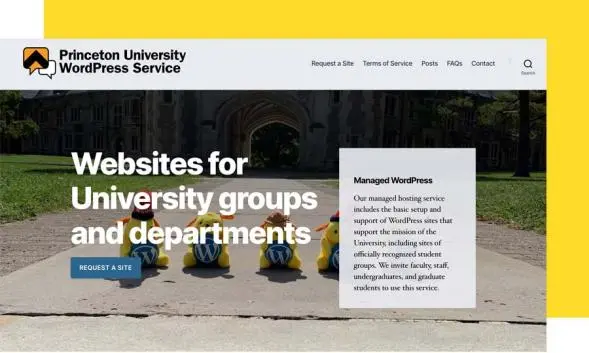
At Princeton University, Pantheon underpins a WordPress Multisite ecosystem at a massive scale. Princeton’s Web Development Services team manages hundreds of departmental and organizational sites with a small central team. By moving WordPress Multisite to Pantheon, the university eliminated the burden of on-prem infrastructure management, stabilized performance and freed staff to focus on campus-specific services rather than server operations. Automated workflows, platform reliability and expert support allow Princeton to offer flexibility to departments while maintaining institutional standards.
We run WordPress here with a small team and their expertise can only go so far. And there are only so many hours in the day. So having the Pantheon expertise to help us tune and run WordPress has just been fabulous. I sleep better at night knowing there's a Pantheon team running this. It allows my team at Princeton to focus on the Princeton-specific and educational-specific functionality and services that we need to offer.”
– Jill Moraca, Senior Director, Web Development Services at Princeton
Next steps for your university
Choosing between WordPress and Drupal doesn’t mean picking the “better” CMS. Universities succeed when their platform supports governance, security and scalability without overwhelming limited teams or slowing innovation. WordPress and Drupal can both meet higher education needs, but the difference is how efficiently your team can operate them over time.
That’s where Pantheon becomes the advantage. By standardizing workflows, automating maintenance and delivering enterprise-grade performance and security, Pantheon turns university websites from an operational burden into a strategic asset – no matter which CMS you choose.
Start using Pantheon today if your institution is ready to modernize web operations, reduce risk and free your team to focus on student experience and growth!